Mobupps·Design, design system and code·2026·14 min
mobupps.com: from the audit to production code
The company website, rebuilt end to end: thirteen page templates on one design system, the search, filters, forms and admin tools underneath them, and a library of 3D illustrations that draws itself in any brand colour. I designed it and I wrote it; a developer reviewed the code and deployed it.
- The problem
- Forty-odd pages built to present eight years of content, not to navigate it. 188 blog posts behind four carousels, the open roles behind 11,528 pixels of photography, case studies published as pictures — and not one filter, search box or record that the people who owned the content could run themselves.
- What I did
- I started with the design system, collapsed the site into thirteen templates on it, and built every one: the markup and styles, the server logic behind search and filters, the job-application pipeline, and admin screens so marketing and HR own their own lists. Then I put the whole site on the packaged system, so every part carries the system's classes and nothing else.
- What came of it
- Reaching an open role takes 75% less scrolling. Every image says what it is, every page has a real heading, a canonical address and structured data, and a new filter value reaches the page with no developer and no deploy. Two people built it: I wrote the code, and a developer reviewed and deployed it.
A site built to present, not to navigate
Mobupps sells four AI products to advertisers and publishers in eight regions. Its website carried eight years of content — 188 blog posts, 22 case studies, and, on the day I measured it, 23 open roles. All of it was reachable. None of it was findable.
The blog was four carousels. Every one of the 188 posts was rendered into the page at once — nearly four thousand elements and over four hundred image tags — to show twelve cards, with no search, no tag and no date. The careers page was nine region blocks of stock photography, 11,528 pixels tall; the region pills at the top looked like filters and were anchor links, and "Apply Now" opened the visitor's mail client. Case studies were published as images: one of them carried 132 words of selectable text.

 BeforeAfter
Before drawing anything I audited every page and mapped what each one was for. The audit changed the brief: "make it look modern" became "make it work". Later I measured both sites with the same script — heading structure, alt text, form labels, page height — because a number like eleven thousand pixels to reach a job ends an argument that "the careers page feels long" cannot even start.
The deeper problem was ownership. There were no filters to manage, no taxonomy to edit, and no record of who applied for a job. Everything that should have belonged to marketing and HR belonged to whoever next opened the code.
It started with the design system
Before any page was designed in high fidelity, I built the foundations and the component library: a type scale with desktop and mobile modes, colour ramps, spacing and radius steps, and components with their full state matrices — the input alone has 56 variants: error, focus, disabled, and the awkward one, error while focused. A library that ships only the default state hands a developer the interesting half as guesswork.
The rule that decided whether it would survive: the Figma variable names and the CSS custom-property names are identical, one to one. Most handoffs lose the system at the border — the designer names a token, the developer types a hex code, and six months later nobody can change the grey.
That system grew into Pepper UI, the company's design system: a Figma library with packages behind it — tokens, components with their icons, and the illustrations — that the website installs at pinned versions. So this was really two projects, the system and the site. This one is about the site.
Forty pages, thirteen kinds of page
The audit's real output was not a list of complaints. It was a template map. Once every address was assigned to one of thirteen templates, redesigning forty pages became designing thirteen, and the rest stopped being design work at all.
Two of the thirteen did not exist before: an About Us page — a B2B buyer looks for the company before the product — and a gated case study, a teaser with a short form that sends the full document. One template I had planned was deleted at a review, because it turned out to be the editorial case study with less content in it. Deleting a template is a design decision: it saves a Figma page, a stylesheet and, later, somebody's afternoon.

The design ran as eight stages, each closed by an approval gate with marketing. Marketing wrote the copy and sent page drafts; everything from there was mine — the structure, the design, the code. On the build side the team was two people: me, and a developer who reviewed my pull requests and ran the deploys. That is the split I would choose again: the person who writes the code should not be the person who approves it.
The first screen
The live block at the top of this case study is the site's home page hero, running on the site's own stylesheets and scripts.
A first screen has to answer three questions before it earns a scroll: what is this company, what does it sell, and what do I do next. The old fold answered none of them in text. The new one states the proposition as a real heading, explains it in one sentence, offers two calls to action with different intents — talk to us, or look at the work — and puts twelve client logos directly underneath, where proof does the most work.
The motion is restrained on purpose. The background is three blurred shapes, each running three animations at once — drift, morph and rotation — on different periods, so the shapes keep changing instead of looping on a beat. The title arrives letter by letter, grouped into words so it can only ever break at a space. A screen reader hears the whole title at once, and without the animation library, or with reduced motion switched on, it is simply text.
Effects that cost almost nothing
Echo AI is the decision engine behind the other three products, so it gets the home page's most expressive block: the hero's drifting shapes again, on a tinted card, and a wordmark that answers the pointer. Move across it and a gradient appears under the cursor, clipped to the letters.
Move your pointer across the Echo AI wordmark — on a phone, drag a finger along it.
It is cheaper than it looks. The script is a dozen lines and does one thing — it writes the pointer's position into two CSS variables. Everything else is CSS: a mask cut to the wordmark's own outline, a gradient layer inside it, and a soft circle at the pointer that reveals the gradient. It works under a finger on a phone, and it fades out when the pointer leaves.
Because it is a few rules and not an animation file, it travels. The same wordmark opens the Echo AI page, set larger in the hero, where it answers the pointer the same way.
Move your pointer across the Echo AI wordmark — on a phone, drag a finger along it.
Illustrations that draw themselves
Product and solution pages need pictures of abstract things: one user moving between a TV, a laptop and a phone; spend following a booking window; supply priced back to a target cost. The usual answer is a bespoke illustration per page, which means a style that drifts with every new picture, and a file nobody can change.
The MAFO page showed exactly where that leads. Its cross-device picture was a one-off 3D scene that shipped its own copy of three.js — two megabytes — and opened a WebGL context at page load whether or not anyone scrolled to it.
So I built a pipeline instead of a picture. Nothing in it is drawn by hand.
- Objects are built once, in code, from shared building blocks: a phone, a laptop, a TV, a pedestal, a server rack, a map, a split-flap board. A simple object and an intricate one are made the same way, so they take the same light, the same outline and the same camera.
- A scene is a description, not a drawing — plain data listing which objects stand where, which arrows join them and how they move. A new scene is composed from the library by whoever needs one, and drawn by nobody.
- Every picture is one definition drawn two ways: live on the web, in WebGL, and as a still SVG for slides and PDFs — every scene in every palette, facing both ways, rendered at build time. Neither is a copy of the other, so they cannot drift apart.
- The rules are the design system's. White objects with one thin dark outline. Colour only as small flat details, and only ever one system colour or the three together. One camera for everything, so any object can stand beside any other. Even the line widths are tokens: change one, rebuild, and every illustration's lines change, live and still.
- Every build is checked: the still against the live render, every palette, every file — and arrows that cross an object or bend too tightly fail the build.
Complex new objects are drafted with AI on a design canvas and taken into the library word for word. A new object is approved as a live model first — rendered, marked up by me against the rules above, then signed off — before a scene may use it.
The piggy bank, second in the block below, is the library's newest object: drafted on a design canvas, marked up four times, then taken into the library in every palette, facing both ways. Each picture in the block opens in a different colour — the colour is a setting, not part of the drawing.
Loading the engine — until it is ready, the element shows the still, so a picture is never empty.
On a page it is one element, placed by name: <pepper-illustration scene="cross-screen-close">. It paints the still immediately, so a picture is never an empty box, and fetches the engine only when a live picture nears the screen. Every live picture on a page shares one WebGL context, pauses when it scrolls away, and a request for reduced motion gets the still. The page pattern is mine and it is written into the site's rules: one live scene per page, the rest stills.
That swap took the MAFO picture from 418 KB at page load to 24 KB — the element and its still — with the engine arriving only when the picture is in view. The site's private copy of three.js went with it.
And it is not only for the website. The stills are the files a slide or a PDF uses, so a deck and a product page show the same picture, in the same colours. The library the website ships holds fifteen scenes; it has since grown to thirty.
Showing the product itself
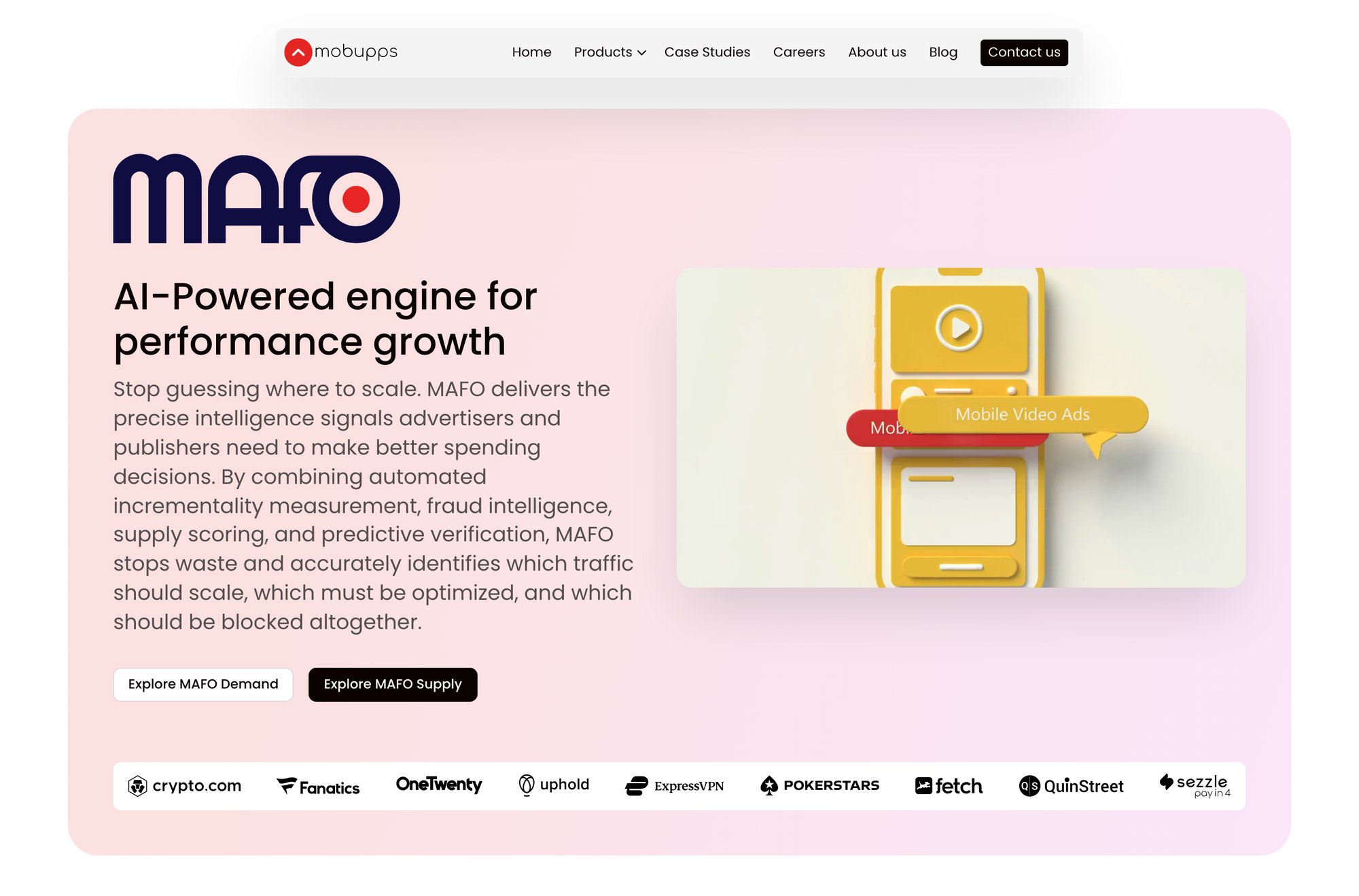
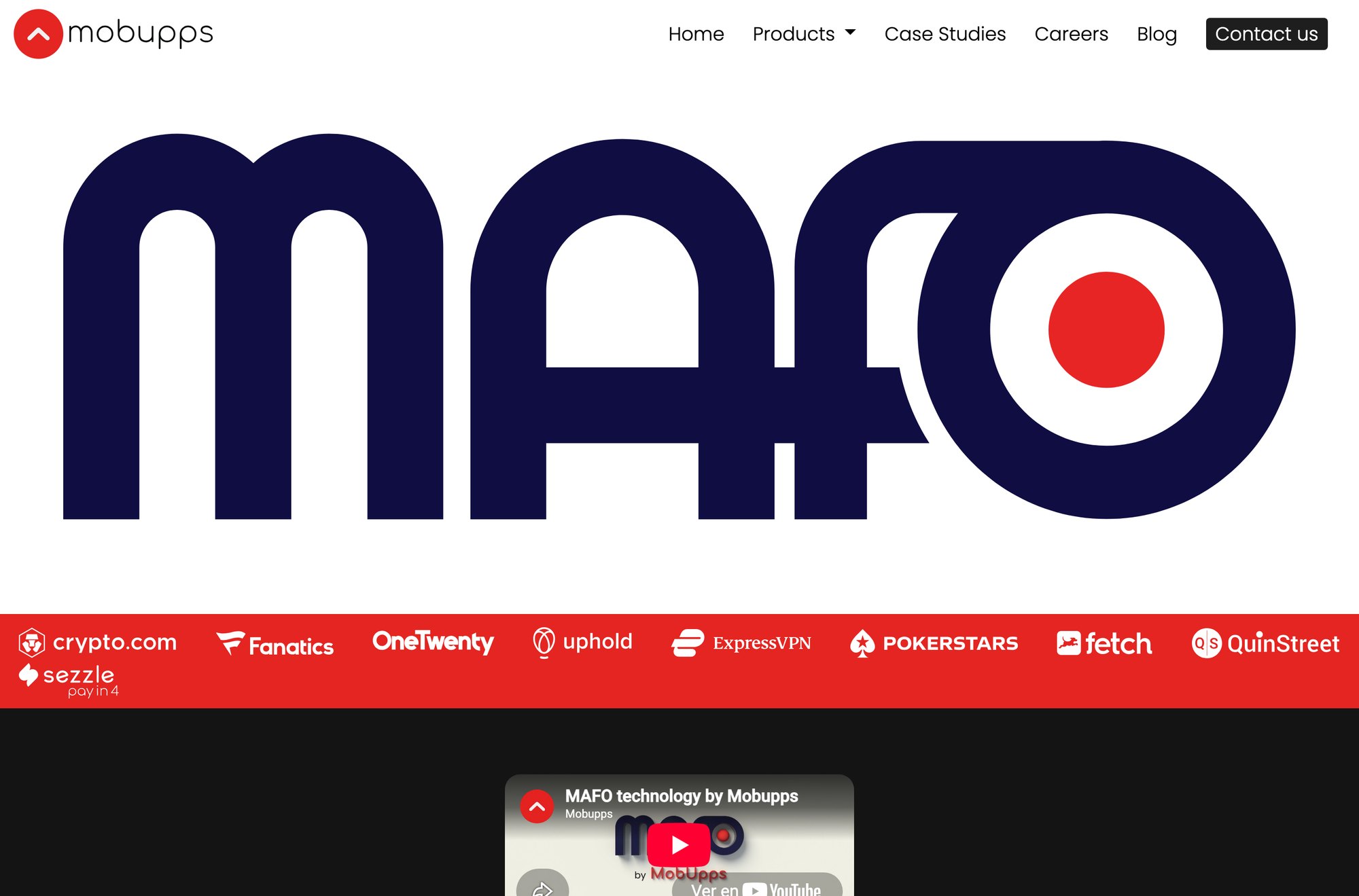
The old MAFO and i/RTB pages carried 81 and 72 images, and not one of them was the product. A buyer evaluating a performance platform is trying to picture the screen they will live in every day. So I designed the dashboards — a reporting view with revenue, ROAS, traffic quality and publisher decisions — in the same design system as the site around them, and built a component to show them.
 BeforeAfter
Every part of the laptop is a CSS shape positioned in its Figma pixels — no image of a laptop anywhere. The slides cross-fade every 4.5 seconds, only while the laptop is on screen.
The details are the part that took the time. The slides cross-fade every 4.5 seconds, but the outgoing slide holds full opacity underneath while the next one fades in — fade both at once and the white screen washes through the middle and ghosts two dashboards together. The slideshow runs only while the laptop is on screen and the tab is visible, and reduced motion keeps the first slide. The same component runs on the MAFO, i/RTB and MobuppsX pages.
The logic underneath the screens
The visible half of this project is a set of filters and forms. The half that took the time is underneath them: which table the options come from, what happens when the result is empty, who is allowed to add a value on a Tuesday — and what the system does with a file that claims to be a CV and is not.
Careers: from nine region blocks to a list you can narrow
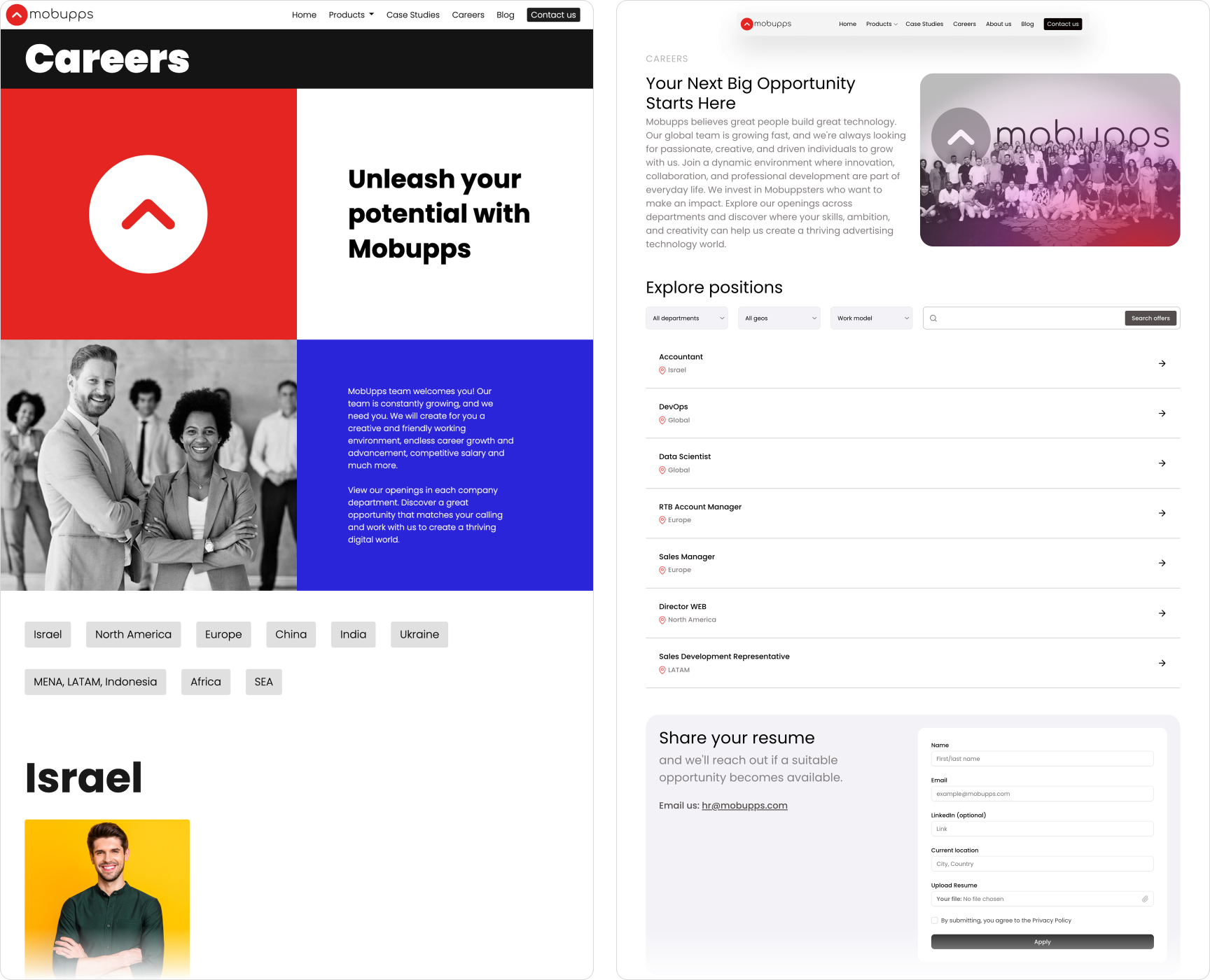
The obvious way to build a filter is to collect the options from the data: look at the open jobs, list the distinct departments. It is less code and it is wrong. Close the last role in Brazil and Brazil vanishes from the menu; open one in Portugal and Portugal appears, spelled however that job was typed. The menu becomes a side-effect of the content instead of a statement about the company.
So the three dropdowns read from three lists that HR owns — departments, geos, work models. A geo stays in the menu with no openings, because "we hire in Brazil" is true whether or not a role is open this week. Options and rows match on a slug, never on the display string, so "United Kingdom" and "united-kingdom" cannot silently miss each other. And the empty state is written, not discovered: a Marketing role, in Brazil, remote, says "No matching openings right now" instead of showing a blank rectangle that reads as a broken page.
"Apply Now" used to be a mailto: link — no form, no confirmation, and no way to answer the only questions HR actually asks: how many people applied, for which role, from which campaign. It is now a pipeline. A hidden field catches bots. The file is checked against an allowed list and a size cap, then its real type is read from its bytes, so an executable renamed to .pdf stops there. It is stored on a private disk under a random name and scanned for viruses on its way to HR, with the result recorded — one database row per application, including the campaign that brought the candidate. A hire can now be traced back to the channel that produced it, which is a recruiting-budget question, not a design one.
The blog: a taxonomy before a filter
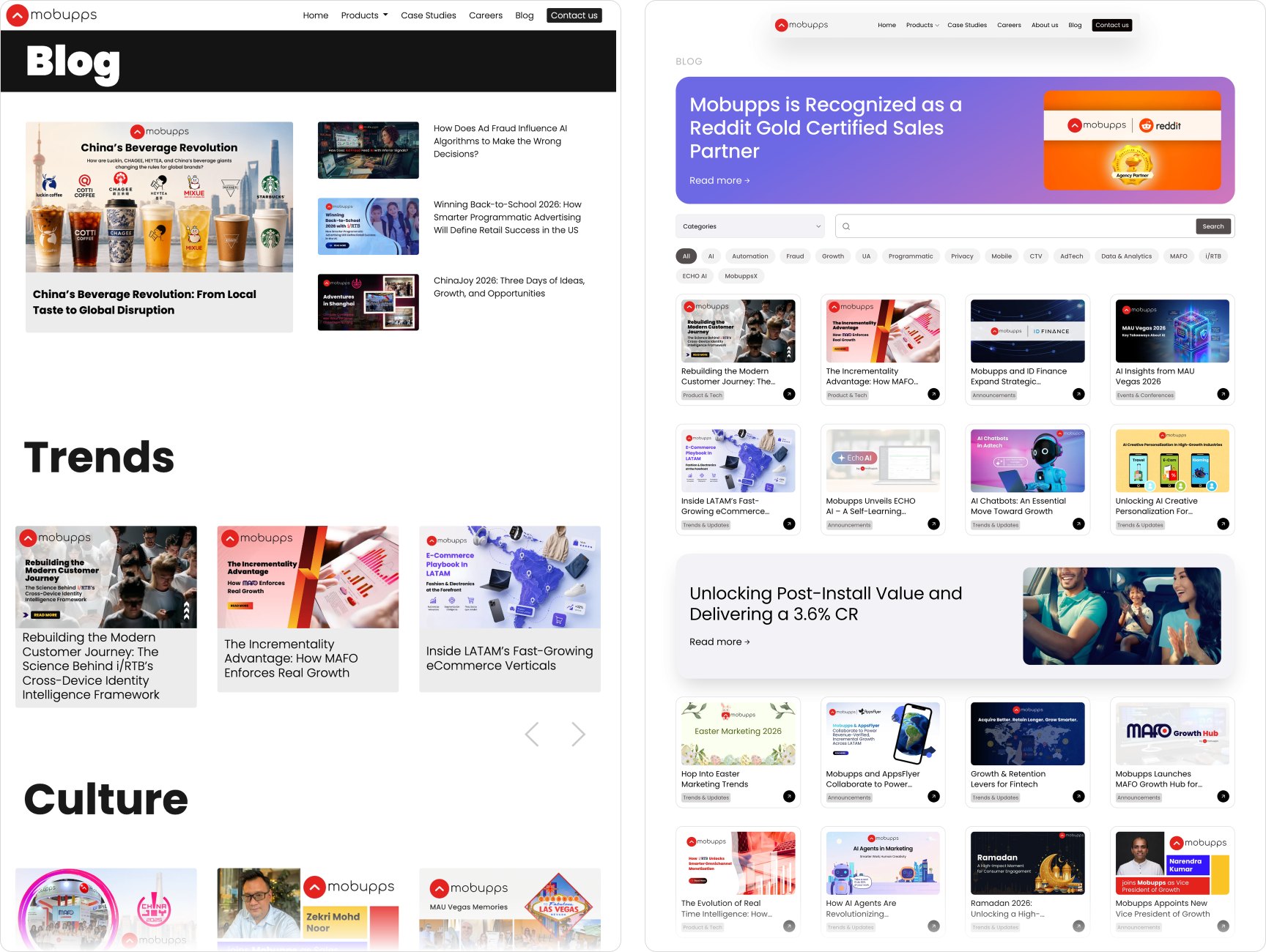
The old blog had four categories, and 96 of the 188 posts sat in one of them. A category holding half the archive narrows nothing, so the taxonomy had to be rebuilt before a filter could be worth building. I read all 188 posts and re-classified them into six categories and fifteen tags, with a written reason for every assignment. No category now holds more than half the archive.
Two rules keep the growing archive honest, and I could only make them because I was going to write the query myself:
- Paging asks for what is older than the last card, never "skip sixteen". Skip-and-take breaks the moment an editor publishes while someone is reading: every row shifts by one and the reader is shown a card they have already seen. It is invisible in a design review, because it only happens in production.
- Tags match any; search words match all. Pick a second tag and you are widening the net; type a second word and you are narrowing it. Same control shape, opposite operators. Get it backwards and the filter feels broken without ever showing an error.
The article page changed as much as the hub. The old one shouted its title in a grey box under a full-width "Blog" banner, and ended in a column headed "Check other cases" — on a blog post. The new one gives the title a real reading size with the cover beside it, puts the article's tags and a newsletter field above the text, and replaces the wrong column with "Interesting for you".
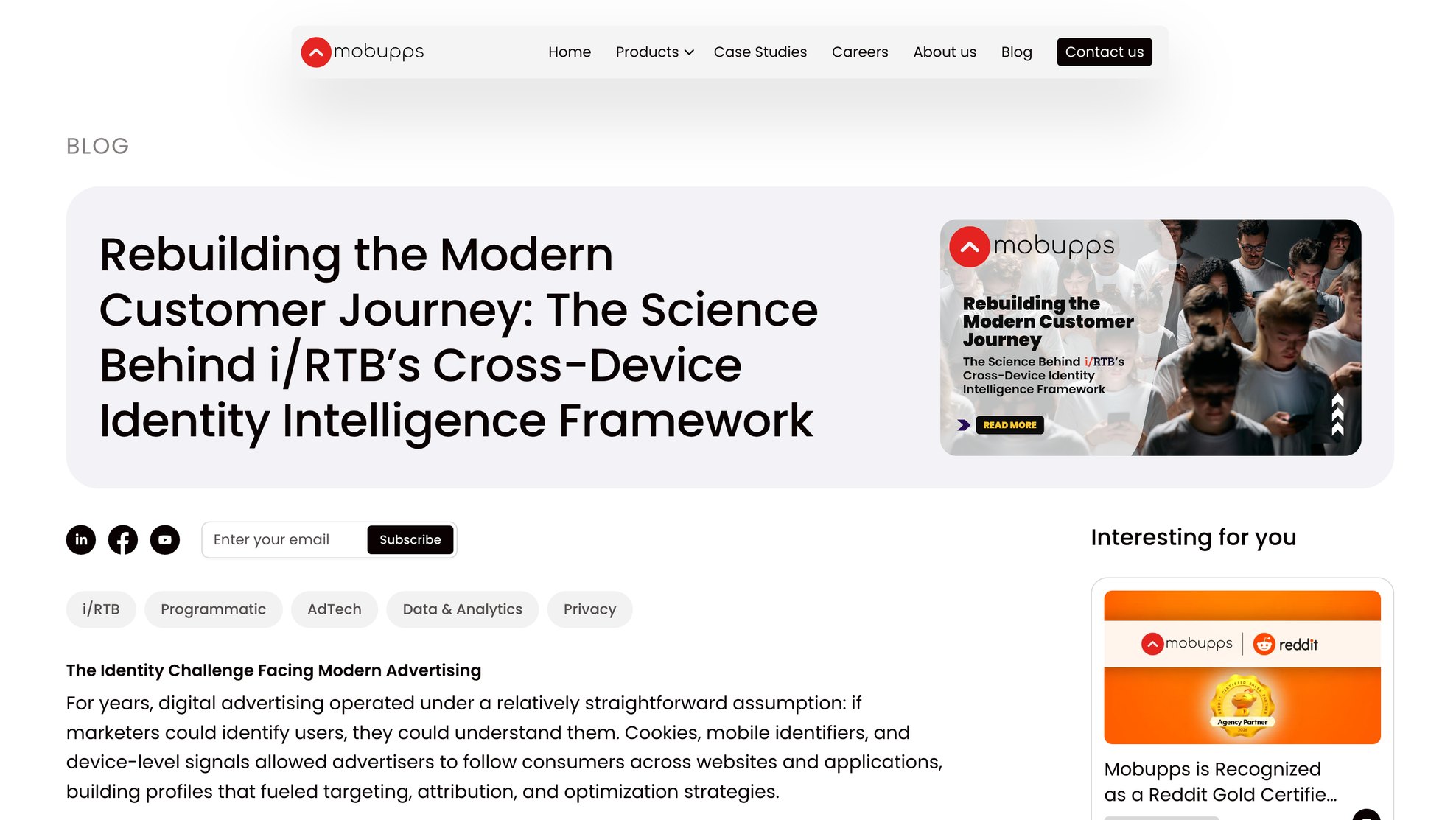
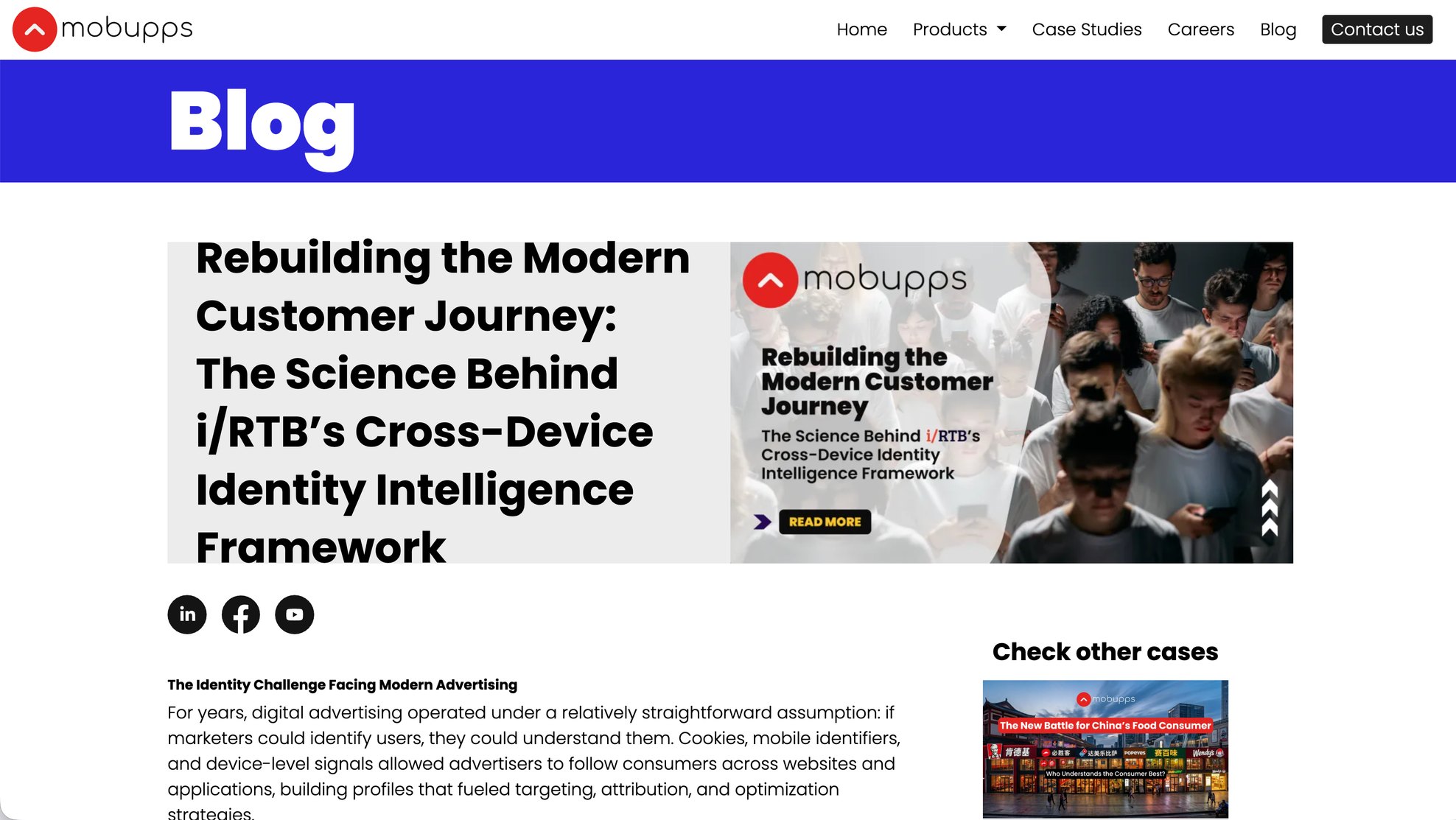 BeforeAfter
"Interesting for you" is not a random list. When a reader arrives from a category or a search, the related posts follow that category; when they arrive from a search engine, nobody has told the page what they were browsing, so it shows the latest posts instead. It never offers the article being read — which sounds obvious, and is the most common bug in a related-posts block.
Case studies that are text
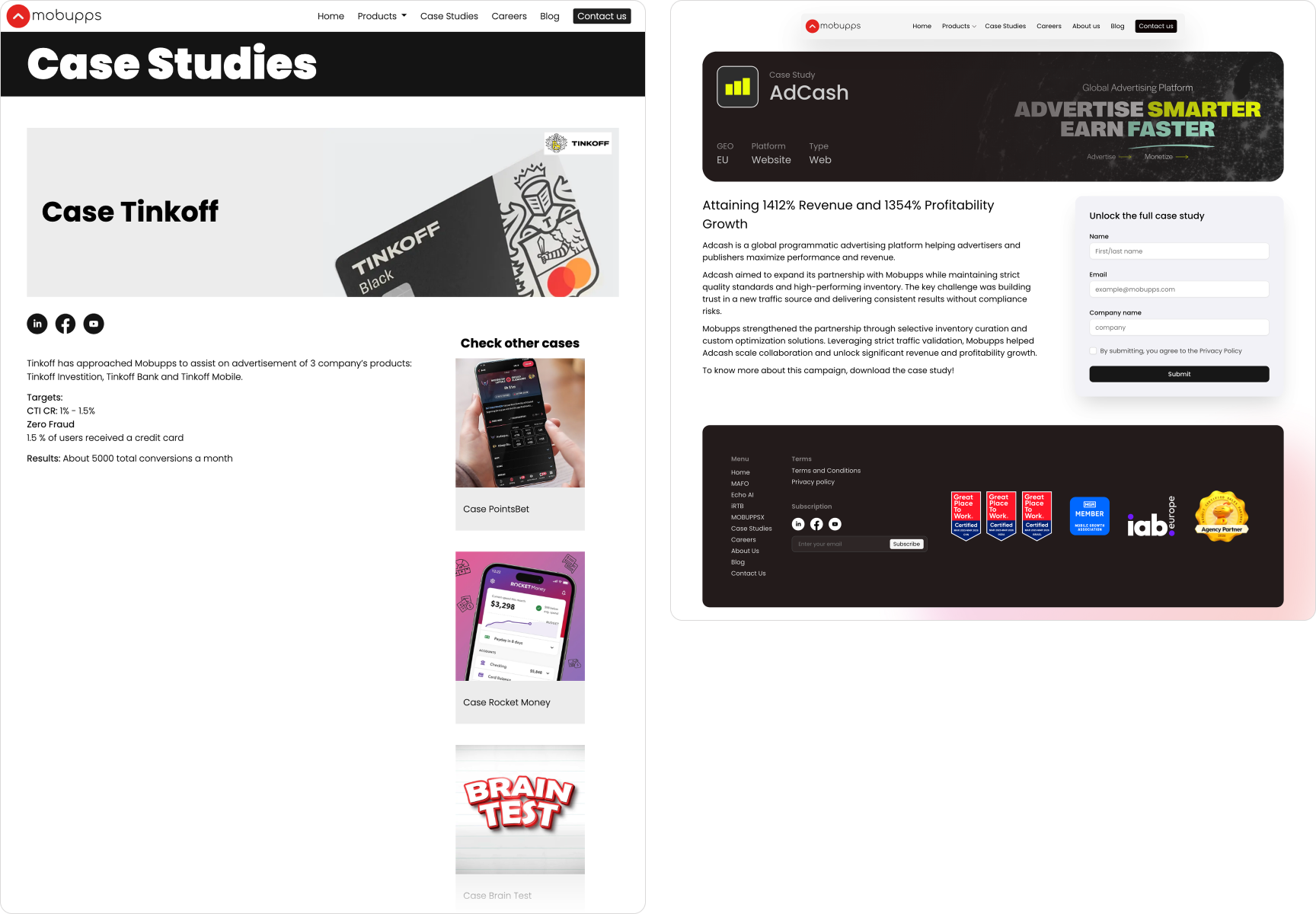
Twenty-two case studies are the most valuable content Mobupps owns, and a case study made of pictures cannot be indexed, quoted by an AI assistant, read aloud or searched by the salesperson looking for the one about a fintech in Africa. New studies are published as gated pages: the result up front, a short teaser, and a form that emails the full document — and tells marketing which study produced the lead.
Old and new studies live in two different tables, and could easily have had two different address prefixes. They share one, resolved behind the scenes, because a visitor should never learn how the content system is organised.
The admin panel is part of the design
A filter only a developer can change drifts away from reality within weeks. So every list on the public site came with an admin screen, and I added three to the company's existing panel: gated case studies, the blog's categories and tags, and the careers lists.
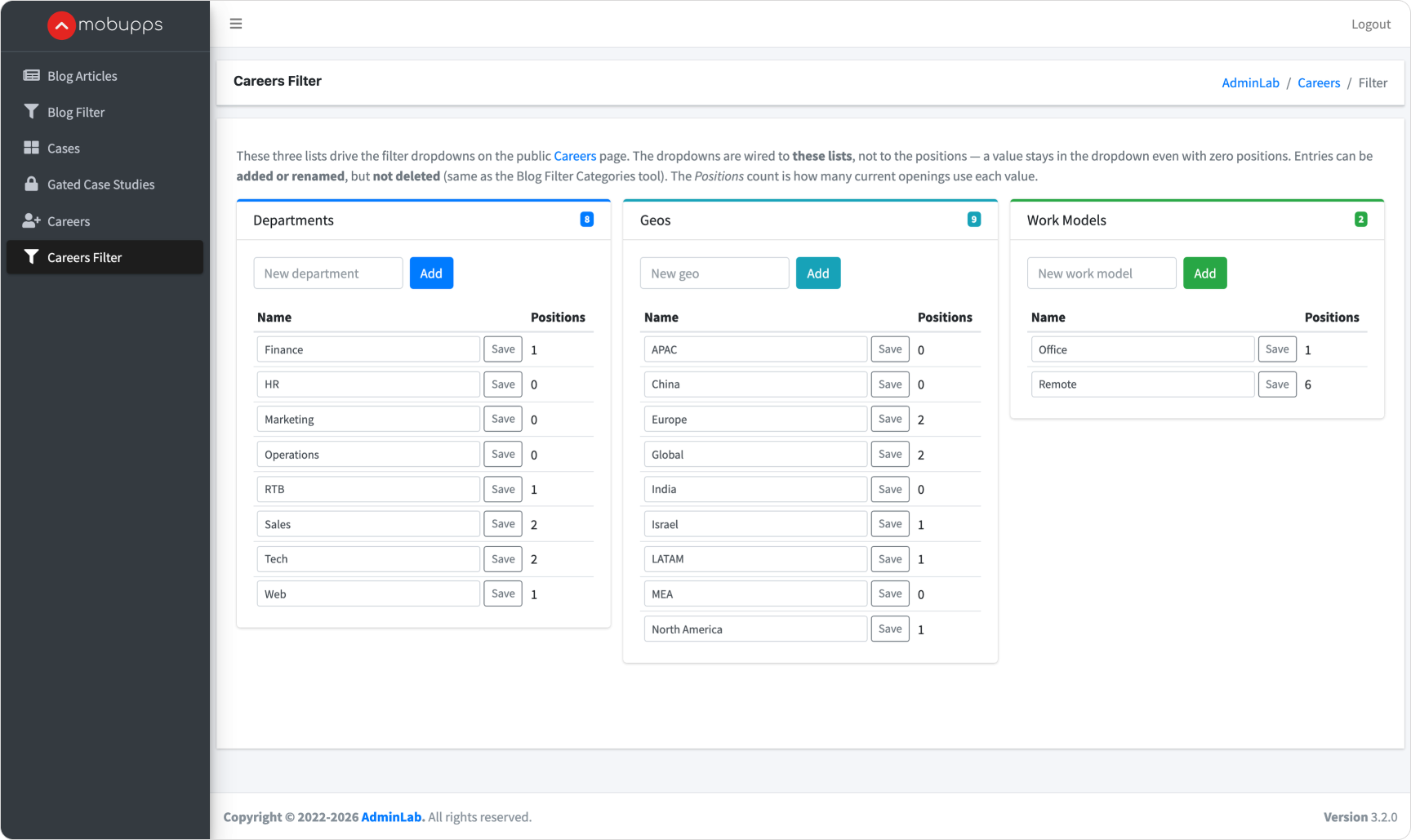
Three rules decided how they work:
- Add and rename, never delete. Deleting a value orphans every job or post that pointed at it, and the damage surfaces weeks later on a page nobody was watching. Renaming is what editors actually want — "Marketing" becomes "Growth Marketing" — and it is safe. So delete is not in the interface at all.
- A rename travels. Department and work model are stored twice on purpose, once in their list and once on every job, which keeps the public list fast. That kind of duplication rots, so a rename rewrites every linked job in the same database transaction. The dropdown and the job row cannot disagree.
- Show the blast radius before the click. Every value shows how many open roles use it. A management screen that hides the consequences of an action has decided its user does not need to know.
Under the hood: one system, one class hierarchy
A redesign usually decays the same way. Each page grows its own version of the card, the button, the heading — a slightly different radius here, a typed hex code there — until changing the card means changing it eleven times. A site that looks consistent in a screenshot can still be forty separate pages underneath.
So once Pepper UI was packaged, I moved the whole site onto it, under one rule: a design-system part carries the design system's classes and nothing else. One card for the whole site, not a card per page. A page reaches a part only through the block that holds it, and states only what is truly the page's — a width in a row, a place in a grid. Colour is an option of the part, set by a single attribute, never a new class. Every value is a token by name, every icon comes from the system's sprite by name, and every illustration is placed by name through one block.
What that removed, measured in the commits:
- elements carrying a page's own class beside the system's: 1,173 → 22 (the 22 are form fields, kept on purpose for their scripts);
- 858 hand-typed values turned into named tokens, and text styles moved onto the system's type roles — 32 uses became 160;
- 349 icons — 182 drawn inline and 167 image files — replaced by the system's icons, by name;
- 333 image files nothing referenced any more, removed;
- the stylesheets of the new pages, 31% shorter.
Every step was a separate, reversible commit, checked by rendering every page at three widths and comparing it, pixel by pixel, with the step before. The legacy pages outside the project changed by zero pixels.
The payoff is the boring kind, which is the kind that lasts: a change to the card is now a change to every card, and a new page is assembled from parts that already know how to behave at every width.
Findable by search engines, and by assistants
On the old site no page had a canonical address and none carried structured data, and the sitemap was a hand-edited file last touched in 2024. The home page's own "Get in touch" button pointed at an address that had never existed.
Now every page has a canonical address, the site describes the company and its pages in structured data, and the sitemap is generated from the same tables the pages read — an editor's save in the admin panel refreshes it. The AI crawlers are named and welcomed, and a hand-written guide for AI assistants states in one paragraph each what the four products are and who they are for. Four products that are genuinely hard to tell apart are exactly the case where an assistant left to guess will describe them wrongly.
The bug I caused, and what it taught me
To make the new sitemap work, I deleted the old static file: a file in the public folder is served before the application ever sees the request, so it would have shadowed the new one forever. On the test server, three admin screens — blog articles, case studies and careers — started returning errors.
The log named the cause: an old class still tried to read that file every time those screens opened. It had nothing left to do, so removing it — 355 lines — fixed all three. The lesson I took: when you delete something, search for everything that reads it, not just everything that links to it. And when the engineering team finds your bug, the useful reply is the diagnosis, written down, not a quiet patch.
What I would do differently
Plan the build from day one. The project was planned as eleven weeks of design. The template map I made in week one was already a build plan, and the build ran more than three months past the plan's end. Planning it as a build would have put the code review, the test server and the deploys into the schedule instead of after it.
Package the design system before the first page, not after. The site was built on tokens with matching names from the start, but the system only became a package once most pages existed — so moving onto it was a second pass over every page. The rule "a part carries the system's classes and nothing else" is far cheaper to follow than to retrofit.
Measure my own work as hard as the old site. The same audit, pointed at the new templates in September, found things I had not planned for: a grey used for small text that falls short of contrast, tap targets under 24 pixels on a phone, and two templates without a main landmark. They went into the backlog with the measurement attached, which is what makes a backlog useful.
Scope, honestly
I designed the site and wrote it in Figma and Claude Code: the audit, the template map, the design system, every template, the front end, the search, filter and form logic, the admin screens, the blog taxonomy and the search and assistant layer. Code review and deployment stayed with the engineering team.
The copy is marketing's. The Echo AI page was built by another developer; I brought it onto the design system and built the hover effect on its wordmark. The page shell still loads the company's legacy Bootstrap and jQuery, because older pages outside this project run on them.
There is no conversion chart here. Every number on this page is a measurement of build quality or capability, taken the same way on both sites — because I would rather show numbers I can stand behind than one I cannot.
Results
−75%
Scroll to reach an open role
11,528 px of region photography down to 2,867 px — three filters, a search box and a location on every row.
944 → 0
Images with no alt attribute
Out of 1,201 on the old pages; none of the 842 on the new templates, each now marked as content or decoration.
2 → 13
Pages with a real heading
2 of the 13 old pages had an <h1>; 13 of the 14 new templates do. The exception is the 404, on purpose.
1,173 → 22
Parts carrying a page's own class
One card for the whole site instead of a card per page. The 22 left are form fields, kept for their scripts.
418 KB → 24 KB
The MAFO illustration at page load
A one-off 3D scene replaced by the design system's element — a still first, the engine only when it is on screen.
91%
Of the new page templates written by me
And all 10,160 lines of their CSS and JavaScript, by the repository's own line history.