Mobupps·Design system — strategy, design and code·2026·17 min
Pepper UI: one source of truth for designers, developers and managers
The company's design system, built from the work it already ships: one set of tokens that writes the Figma library, the CSS, the React theme, the chart palette and the rules the AI tools follow — with 88 components, a brand anyone can download, and a test behind every rule. I designed it and built it in Figma and Claude Code.
- The problem
- The brand blue answered to six different names across the company's files, and four names meant two different colours each. The decks, the website and the products each kept their own copy of the palette, the type scale and the rules — and the rules that mattered most existed only as corrections I had made in reviews. Developers do not open Figma, and managers should not have to.
- What I did
- I audited every surface by hand, then built one source: tokens that generate the Figma variables, the CSS, the Tailwind and React themes, the chart palette, the PowerPoint exporter's colours and the AI tools' rules. On top of it: 88 components with written contracts, a documentation site the build writes, a brand section for people who are not designers, and a test behind every rule.
- What came of it
- One name for every colour, and a build that fails when Figma, code and documentation disagree. The new company website installs the system as versioned packages. A product dashboard and the deck tool were moved onto it in working copies, the deck tool with zero pixels changed. Every contrast pair and every focus ring is measured, not assumed.
Six names for one blue
The Mobupps brand shows up in four places: the sales decks, the company website, the products its clients log in to, and a growing set of AI tools that make slides and pages on their own. All four were on brand at a glance. None of them agreed underneath.
I audited twelve surfaces by hand — the decks, the website, the products, the brand files and the AI skills — and recorded every colour, size and spacing value in each one, verbatim, with its name. Then I read the list twice.
Grouped by value, the brand blue #2B25D9 answered to six names: Persian Blue in the deck kit, color/blue/400 in the site's Figma file, --persian-blue and --blue in the deck tool, --color-blue-400 in the site's stylesheets, blue/400 in an AI skill — and once to no name at all.
Grouped by name, it was worse. --blue-bg was #E9E9FB in one file and #D4D3F7 in another file of the same app. --near-black was #141414 in one place and #171717 in the next. Nothing errors when that happens. The colour is just quietly wrong, and stays wrong until a designer happens to notice.
The rest followed the same pattern. Four different blacks were in use. The deck's headings were 66, 46 and 41 pixels; the site's were 65, 45 and 40 — two type scales one pixel apart, each correct in its own file. Charts were drawn three ways — two code libraries and Figma — with the palette copied by hand into each, and the PowerPoint export drew the third and fourth series in different colours from the browser.
Then I measured what actually reaches the screen: of every colour painted by the code, how many arrive through a named value rather than a hex code typed by hand. On the first day it was 41% — 2,349 of 5,730. The spread was the real finding. Wherever a designer had worked, between 57% and 68% of the colour was named. In a product front end built without a designer, it was 2 out of 1,830. In the AI skills it was zero.
The last gap was me. The rules that mattered most — no number floating without a container, padding equal on all four sides, a chart that shows its own baseline — existed as corrections I had made once, in a review. A system that lives in one person's head scales exactly as far as that person's calendar.
Built for the people who are not designers
A design system that lives in Figma serves one person: the designer. Developers do not open Figma. Managers should not have to. So the first design decision was not a colour — it was who arrives at the system, and what each of them is trying to do in the next five minutes.
The top of the documentation’s Getting started page, on its own files. The four cards lead to pages that are not published here.
- Designers work in one Figma library. Every variable carries the name the code uses, so a developer inspecting a frame reads
var(--pui-…), not a number to retype. Every component is drawn in every size and every state it can be in, so nothing is left for a developer to guess. - Developers install packages:
@pepperui/tokensfor the values in CSS, SCSS, Tailwind or Python;@pepperui/cssfor the components as plain classes, no framework required; React components by name through the shadcn command line. A component is called the same thing in Figma, in the stylesheet, in React and in the documentation — and the tests fail if it is not. - Managers, sales, marketing and HR get a brand section written for them: the logos with their rules, the colours to copy, the fonts with a four-step install guide, the social templates, the swag. Every file downloads from the page, and nothing on it needs a Figma seat. For a client deck there is one route: the deck tool, not a blank slide.
- The AI tools read the system the way a developer does — from a generated file — instead of carrying a pasted palette that drifts.
- Anyone can ask for something through a short request form that does not assume they know what a token is. Every request gets one of four answers — it exists, it is queued, it is declined and why, or a question back — with a first answer promised within ten working days.
Principles come out of the work
I did not write the principles first. I took the corrections I had made over years of reviewing decks, dashboards and pages, grouped them, and extracted twelve. Each one names what it rules out, because a principle that forbids nothing is decoration. Three of them:
- One thing per view. When it does not fit, cut content — never shrink the type or the padding. Rules out: two primary actions on one screen.
- Consistent in the parts, varied in the composition. A component is identical everywhere, to the pixel — and two screens built from those components must not look alike. Rules out: slide two being slide one with new numbers.
- Nothing from outside the system, and nothing patched on top of it. When an instance looks wrong, the fix is the component, never an override on the instance. Painting over an instance is the same mistake as typing a hex.
I borrowed in a fixed order: shadcn first, then GitLab's Pajamas, then Google's Material. From Pajamas came the structure — principles that forbid, the documentation as the brandbook, its contrast rules. From Material, type named by role rather than size, and touch-target minimums. From shadcn, the component language and the way components are distributed. What I refused was their uniformity. Material and Pajamas prize screens that all look alike; this system also has to produce client decks, and a deck of identical slides fails at its job. That is why the second principle exists.
One source, every side
The system has one source of truth: a set of token files, in the W3C design tokens format, in three tiers. Primitives are the raw values. Semantic tokens say what a value is for — the text on a card, the border of a field in error. Component tokens exist only where a component genuinely deviates, and the file says so in its header: if it grows, the semantic layer is wrong.
Three rules keep it honest:
- Names are numbers, not adjectives. Persian Blue and Alizarin Crimson are retired.
blue/400tells you where it sits in its ramp; a poetic name tells you nothing, and a second one can always be invented. - Every value cites its source. Each token carries the file it was quoted from, so a value can be traced back to the surface that proved it.
- Nothing is eyeballed. Two steps of the grey ramp did not exist anywhere in the company's files, so they were derived: the midpoint of their two real neighbours in OKLab, a colour space built for how people see. The same midpoint in plain RGB lands visibly too light. A script re-derives them in every test run and fails if they drift.
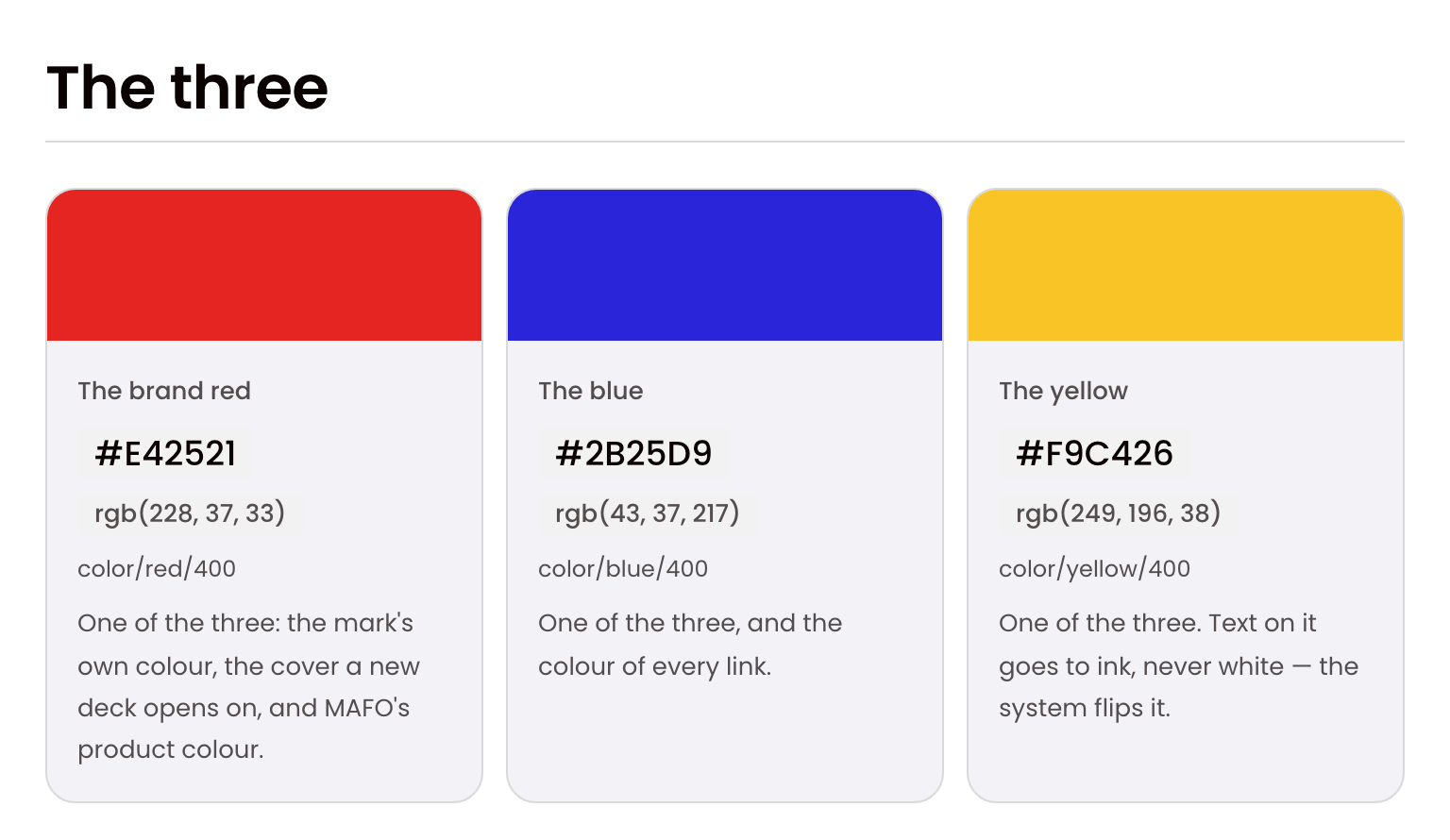
Three colours carry the brand, but a system needs more than three. Behind them sit eight more — each accent's own light tint, the three gradient stops the cover washes are drawn from, and the two status colours — and each one says the single job it has. A secondary colour never becomes the accent of a document; it supports the one that is.
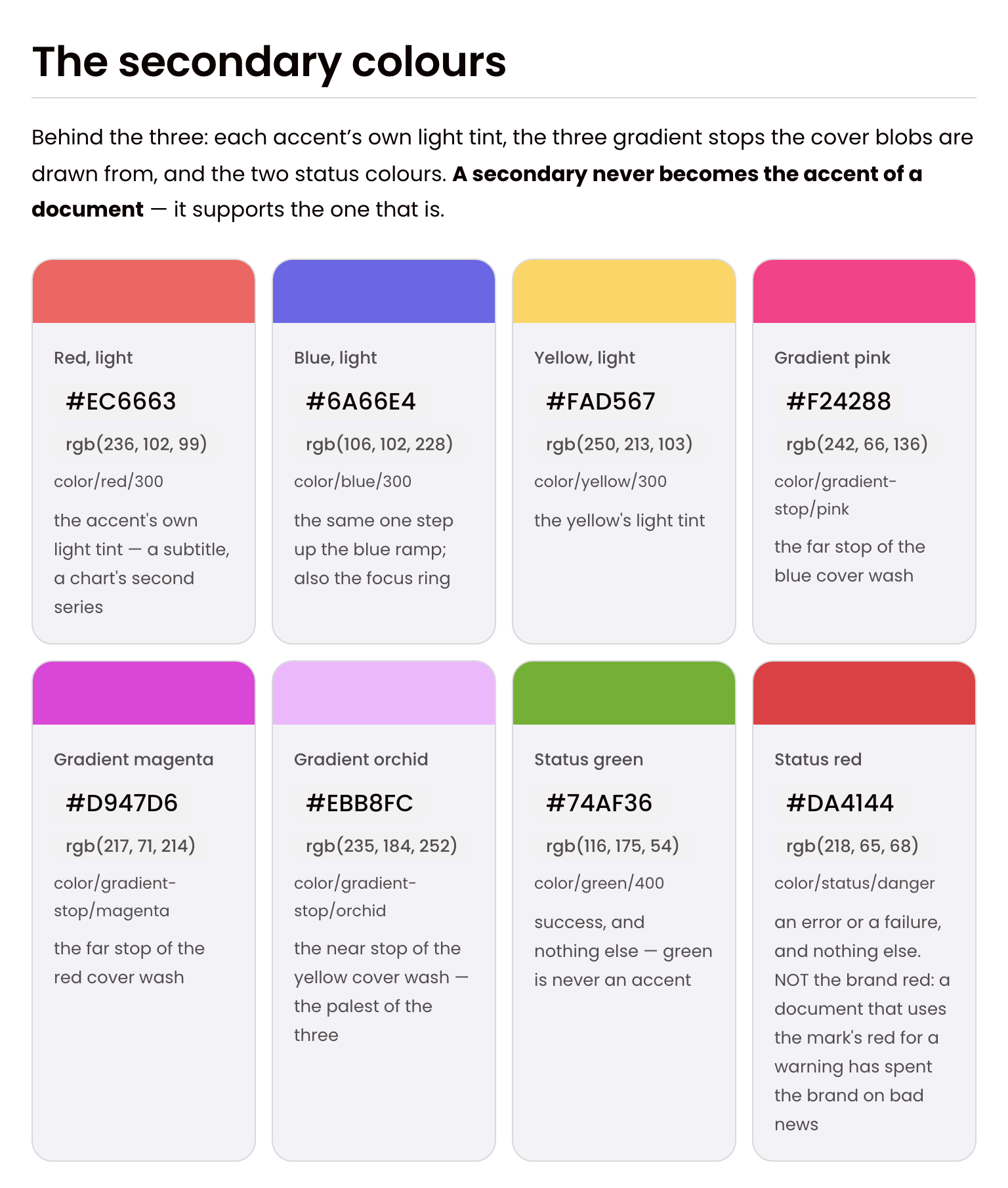
Underneath both sits the full system. Every colour is a ramp, and every step is a token with a number and, where it has one, a job: the accent's background at 100, the brand itself at 400, a table's header at 700. The grey ramp runs eleven steps, from the page's white to the black kept for print.
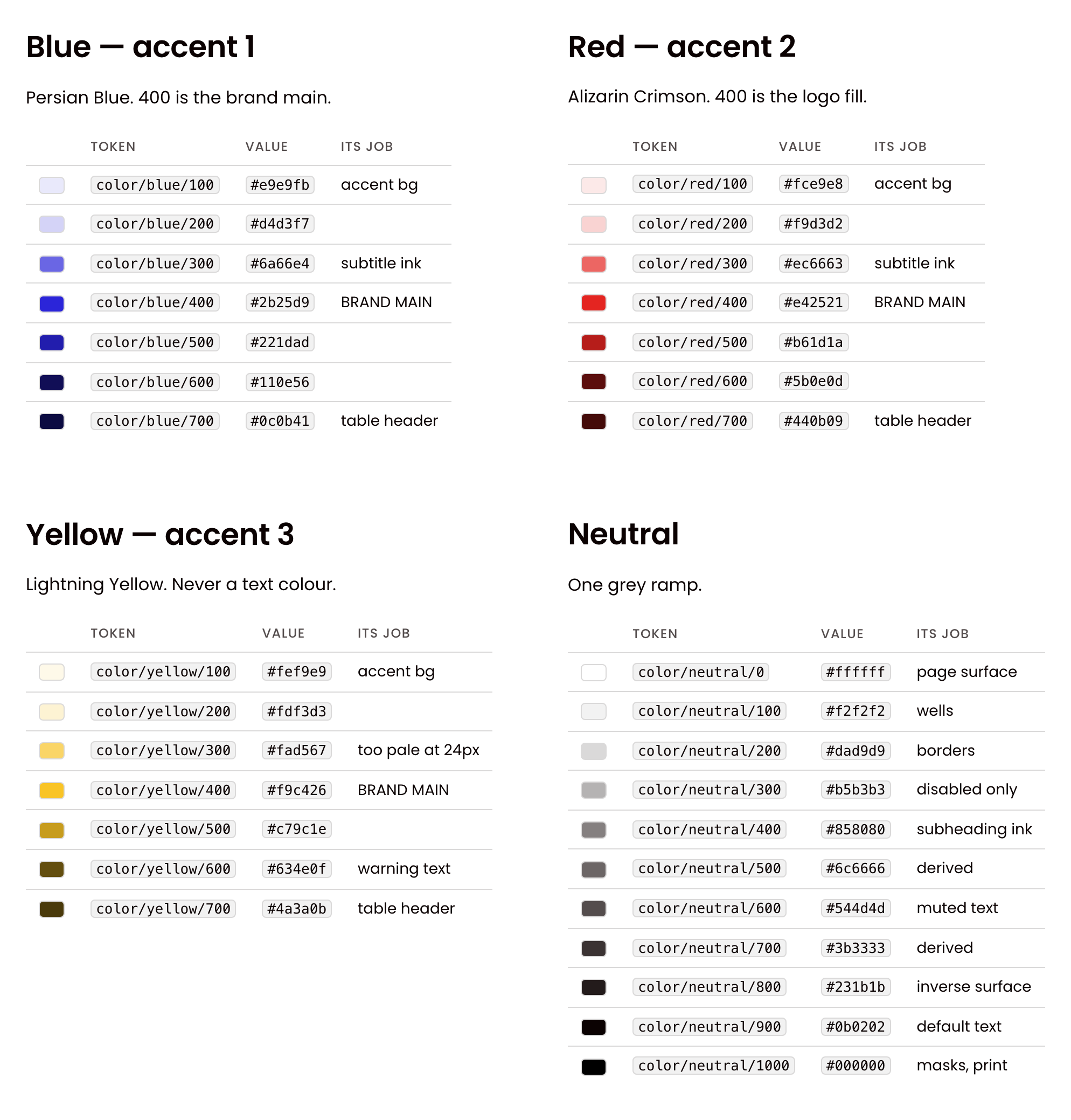
Space, corners and depth are scales too. Space runs from 2 to 128 pixels on a 4-pixel base, and corners double, from 4 pixels to a full pill. The rules I used to repeat in reviews are written beside them as sentences: a label is a pill and an action is a square; whatever sits inside a container is one radius step smaller than the container; padding is the same on all four sides.
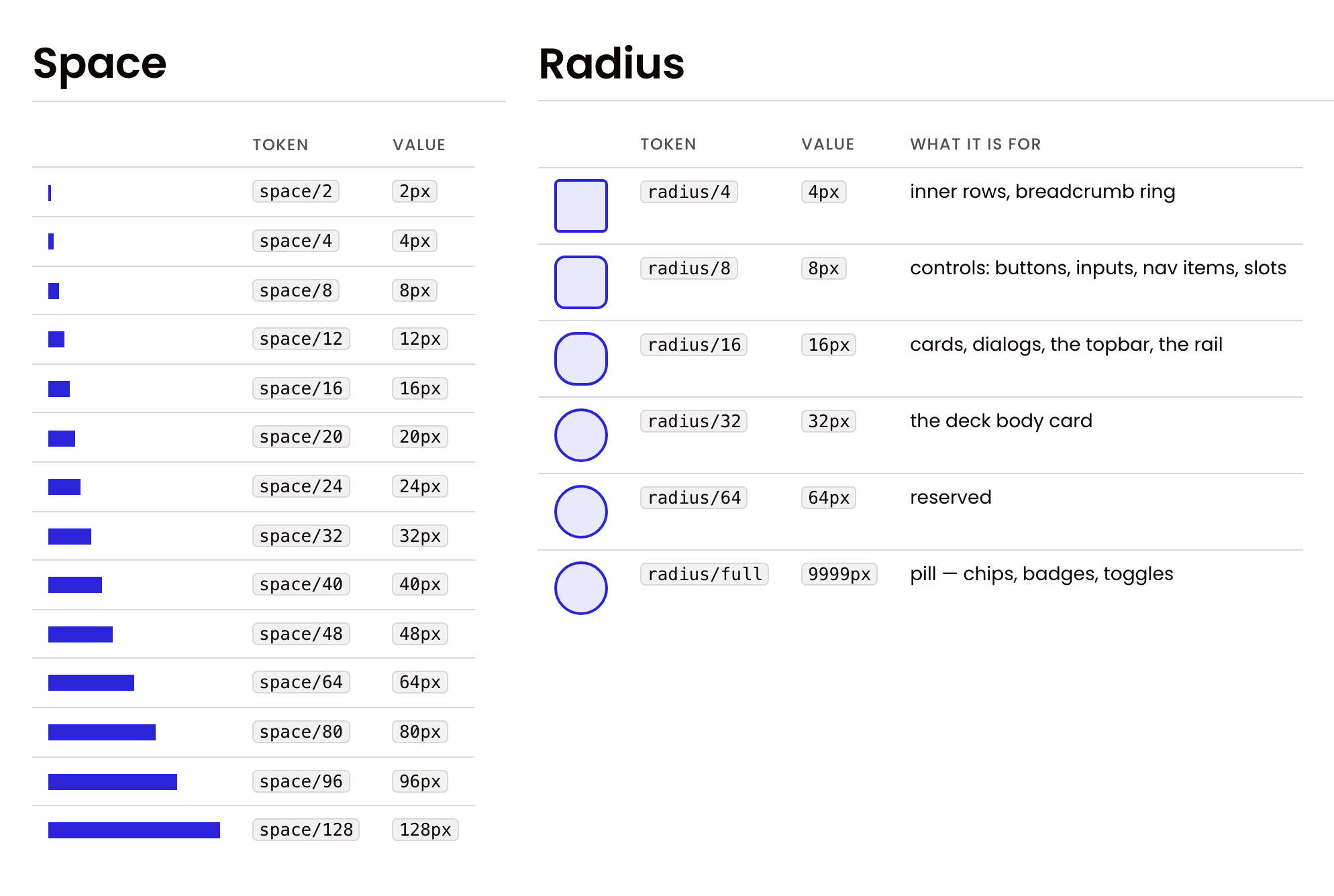
Depth is mostly tonal — a card on the page, a slot in a card — so shadows are few, and each one is named for the job it does.
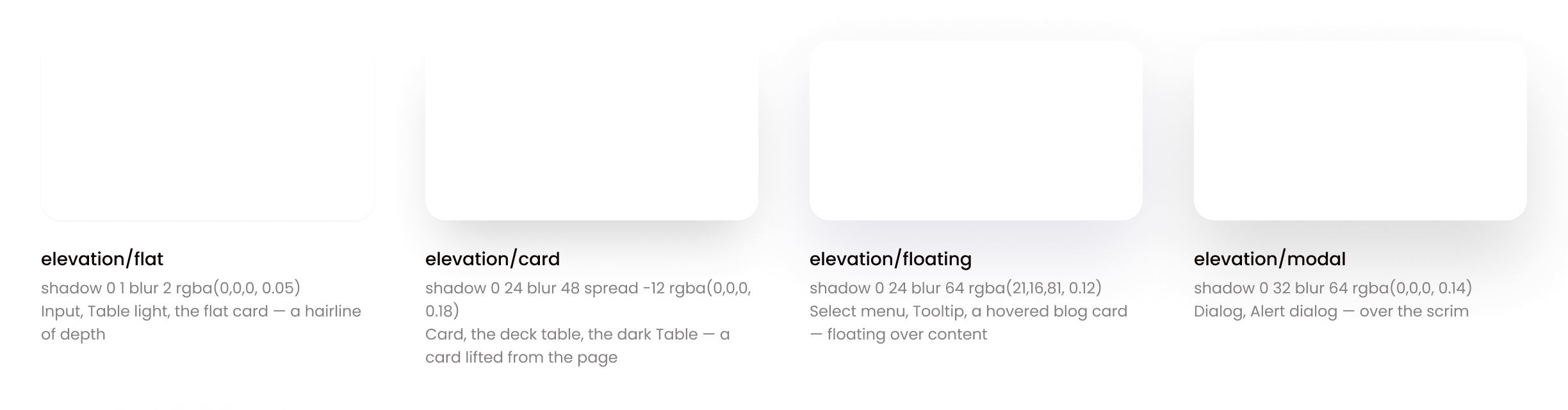
Values change with modes, not with copies. The accent mode switches a surface between blue, red, yellow and all three. The canvas mode switches the type between the website at desktop, tablet and phone sizes and the 1920-pixel slide — which is how the deck's 66-pixel heading and the site's 65-pixel one became one role in two modes instead of two scales. Dark mode is not built yet, on purpose: Figma's plan allows four modes per collection, and the four accent modes the products need came first.
One build turns the source into everything a team uses:
- CSS custom properties for the web, and SCSS for the website's PHP stack;
- a Tailwind preset in both of its current formats, and a theme for shadcn;
- the Figma variables, with their code names attached;
- a Python module, so the PowerPoint exporter draws with the same colours as the browser;
- the chart palette and the illustration library's values;
- and
DESIGN.md, the file AI agents read to learn the system.
A rule with a test behind it is a rule; a rule in a document is a hope. That sentence opens the system's verification script, and the test run makes 27 checks. Some are about values — no hard-coded colour above the first tier, no Figma collection over its four-mode limit. Some are about agreement — the chart theme equals the tokens, every icon a page draws exists in the library. The one that matters most is parity: a script reads the Figma library and the code and fails the run if a component, a variant or a name exists on one side and not the other.
One typeface, four jobs
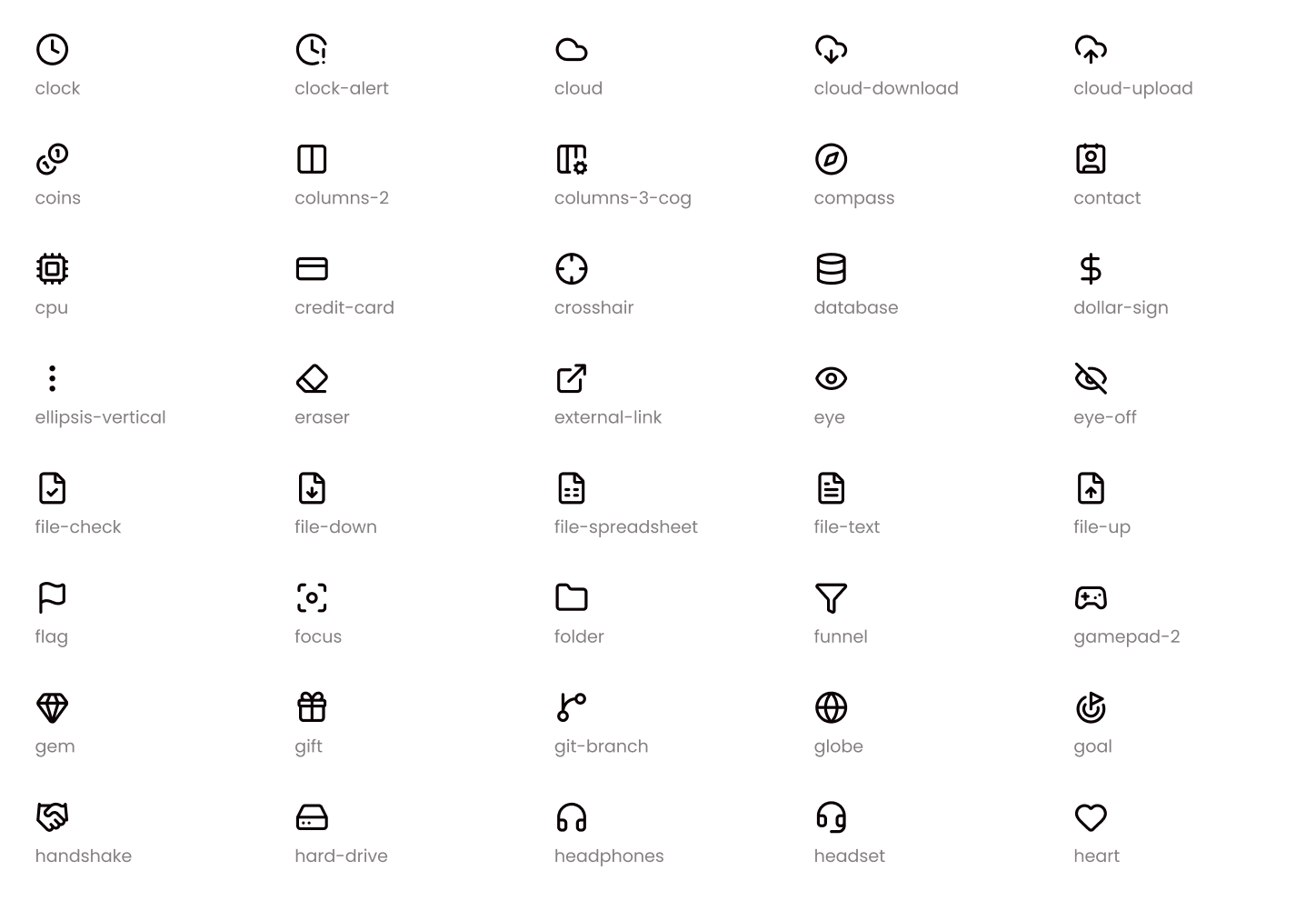
The brand has one typeface, Poppins, in four weights, and the system gives each weight a job. Regular is for reading. Medium is for body-sized emphasis — buttons, labels, a card's title. SemiBold is a display weight for headings and big numbers, never for body text. Bold is kept for the few places the deck sets it — a table's row headers, cover and chapter titles. Light and Black, the weights the old brandbook named, are out.
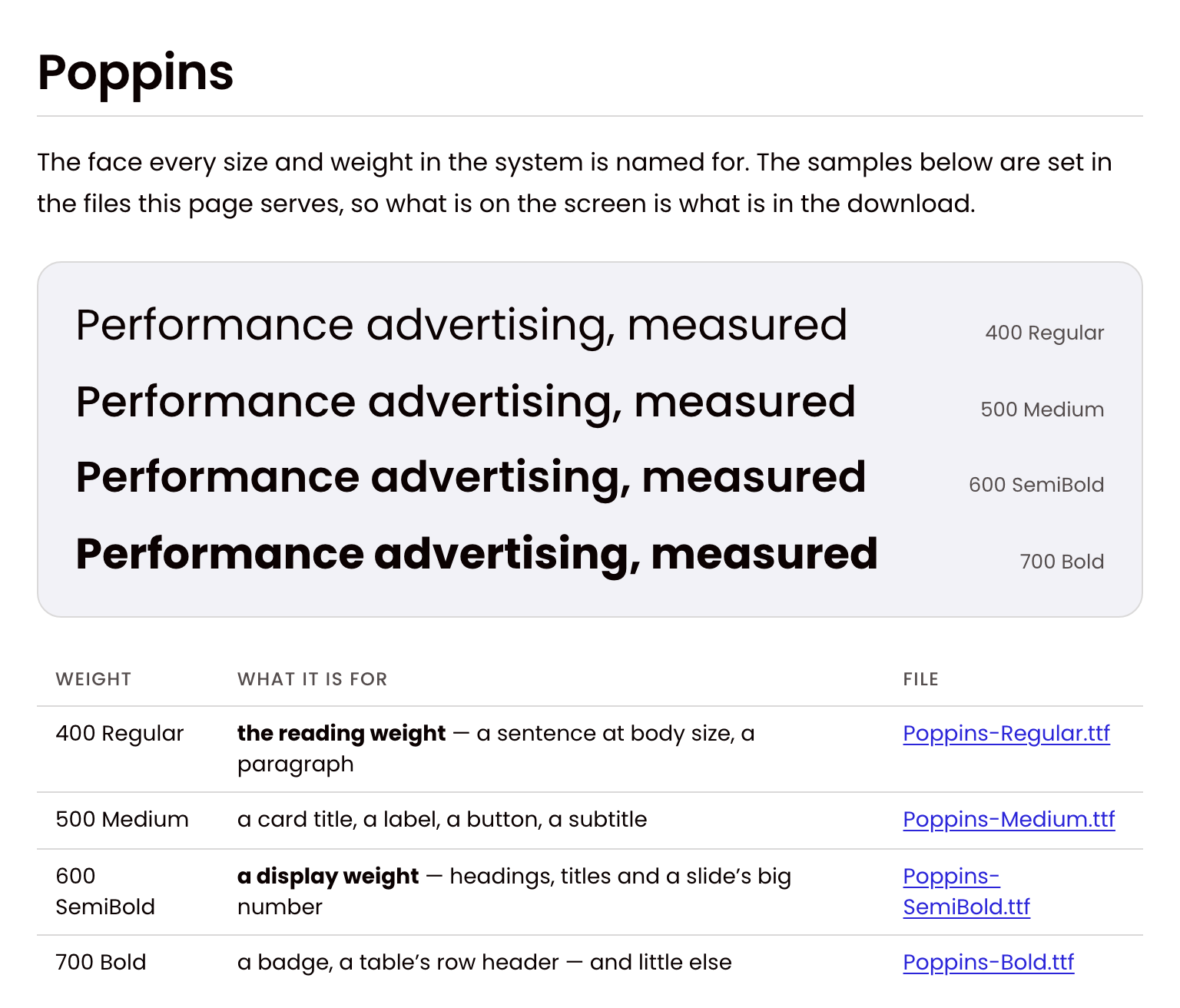
Icons work the same way: one set, Lucide, at four sizes — 16, 24, 32 and 48 pixels — each a token with the place it belongs. A glyph is swapped, never redrawn, and one the set lacks is a request to the system rather than a file of a page's own. The CSS package ships the same 276 glyphs as one sprite, so a developer writes the icon's name and the component paints it.
Components with a contract
The system holds 88 components. I did not pick them from a list of what design systems usually have. I took what the company's products and pages actually use, added shadcn's standard set so a developer never meets a gap, and added a whole family for the AI assistant's chat — messages, suggestions, attachments, the composer — because that is where the products are going.
The wall below is the documentation site's own front page, running on its own files. Every card on it is a component from the package, placed as it is — the page draws nothing of its own.
Every card here is a component from the package, placed as it is — the page draws none of its own. Type in a field, flip the switch, tick the box.
Every component carries a contract, written once in Figma and carried into the code and the documentation: when to use it, when not to, what it is related to, and its anti-patterns. The button's says two primary buttons side by side, a primary button for cancel, ALL CAPS labels, and a fill changed on the instance. A contract is what lets a developer, a new designer or an AI agent make the decision I would have made — without asking me.
The block below is the CSS package's specimen — the page its screenshot tests are taken from — one component at a time. The two switches above it are the workshop's own: accent and canvas, setting the same two attributes the workshop sets.
Button. The section of the CSS package's specimen — the page its screenshot tests are taken from — with every size and state the component has. Switch the accent or the canvas the way the workshop does.
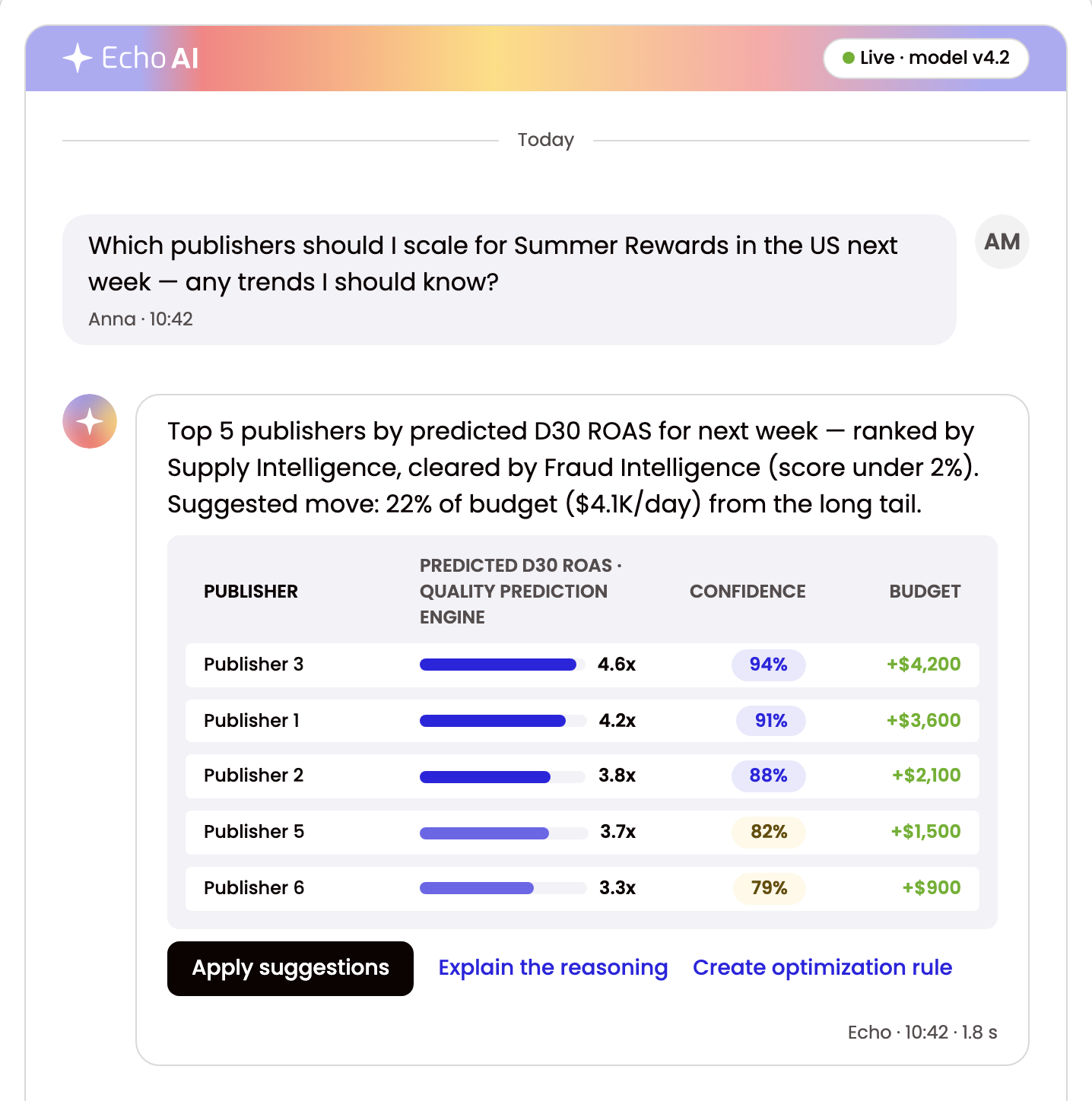
Components also add up to patterns, and the newest is where the products are going: a chat with Echo AI, the company's AI assistant. It is nine components in one column — the card under its branded strip, the thread, the turns, the bubbles, the ranked proposal, the projection chips, the markers, the attachments and the composer — with one rule above them all: text a model wrote is marked where it appears.
Components are released as Beta and earn Ready in production, not by a version number. Beta means usable, with an interface that may still change in a minor release; Ready means it changes only in a major one. A component gets there by being used in a product, which is a bar a release cannot clear on its own.
Accessibility, measured, not assumed
Accessibility claims are easy to write and hard to check, so the system measures instead of claiming.
- Contrast, by role. Not every colour against every surface — that produces hundreds of meaningless failures. Each text role is checked on each surface it can actually sit on, nine roles by ten surfaces, and every one of the 90 cells has a verdict.
- The focus ring, rebuilt. The ring the website used was a 15% tint, about 1.2:1 against the page — invisible to anyone who needed it. The new one is a 2-pixel line that clears the 3:1 floor on every surface a control can sit on, with the old tint kept behind it as a soft halo. Of the focus indicators the package paints, 330 of 333 now meet the strictest focus criterion in WCAG 2.2.
- The keyboard. Tab order is document order across all 344 stops, and Shift+Tab is its exact reverse — no keyboard traps anywhere in the library.
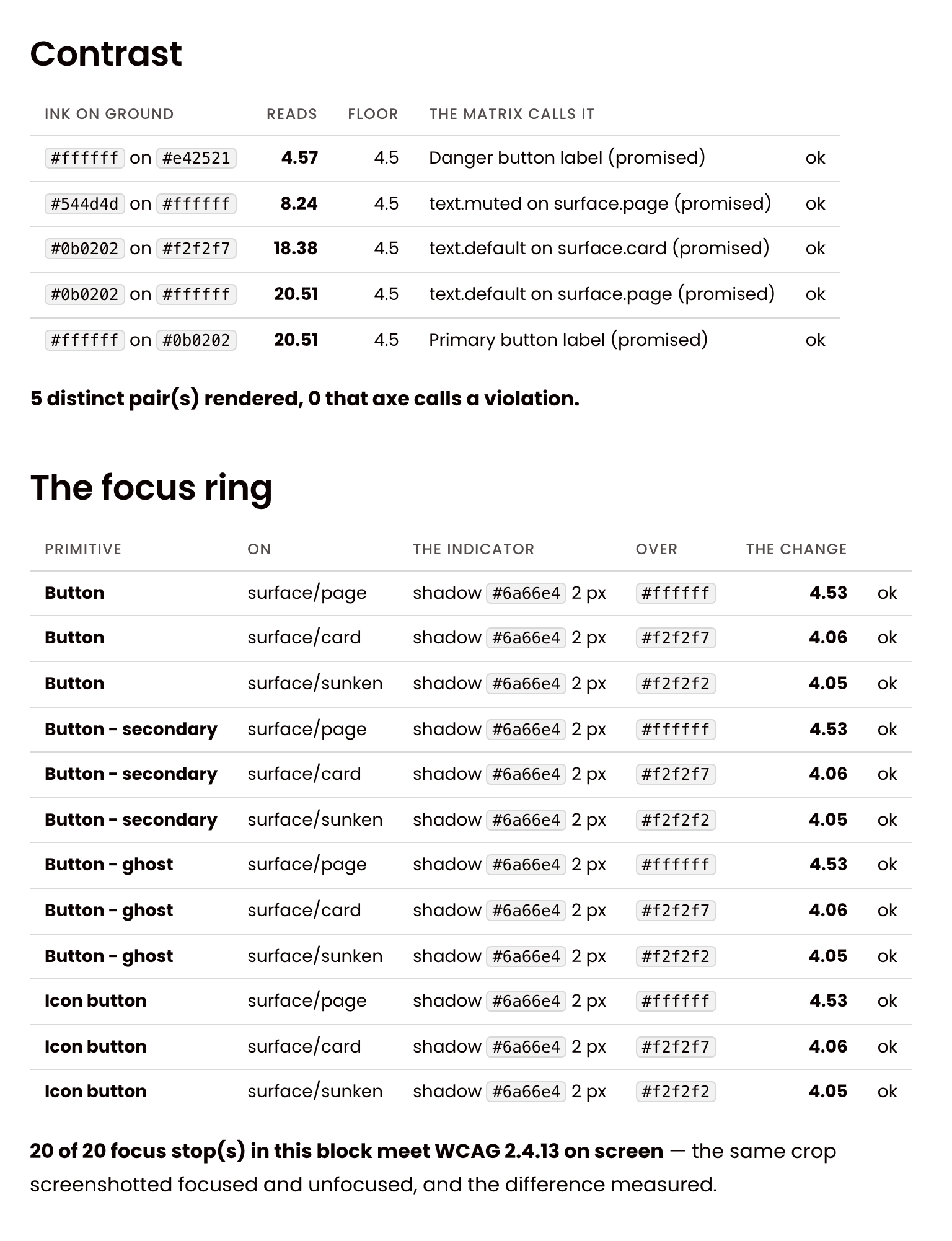
One exception is on record, and it is deliberate. The red subtitle reads 2.83 against a 3.0 floor on a card. It has been in front of real users across the site, the decks and the deck tool without a complaint, and retuning the brand red to pass one threshold would have broken the colour system everywhere else. So it is written down — named, dated, limited to that one pair in that one role — and reported by the tools rather than hidden. An accessibility tool that suppresses a real number is worse than none.
Charts from one palette
Charts were where drift had already become a visible bug, so the chart package was built early: one palette, four renderers — ECharts and Chart.js in the browser, the PowerPoint exporter, and the chart recipes in Figma. Every one of them reads the same values from the tokens.
The rules were settled on pictures, not in a document: the same chart drawn two ways, side by side, and the better one kept. Twelve came out of it. Eleven are about a chart's shape — a column stands on its baseline, a value axis draws a gridline at every labelled tick, a ranked list reads from the largest down. The twelfth is about colour, and it makes colour a rule rather than a choice: each accent mode has its own series order, so a chart never has to invent a colour. The block below holds six of the standard's own charts — one of each kind — running on their own files: pick an accent and watch the rule work on all six at once.
Six of the documentation's own charts — columns, line, horizontal bars, forecast, donut, stacked columns — drawn from the accent's chart tokens. Pick another accent: every series re-reads its colour from one attribute on the page.
Illustrations that are built, not drawn
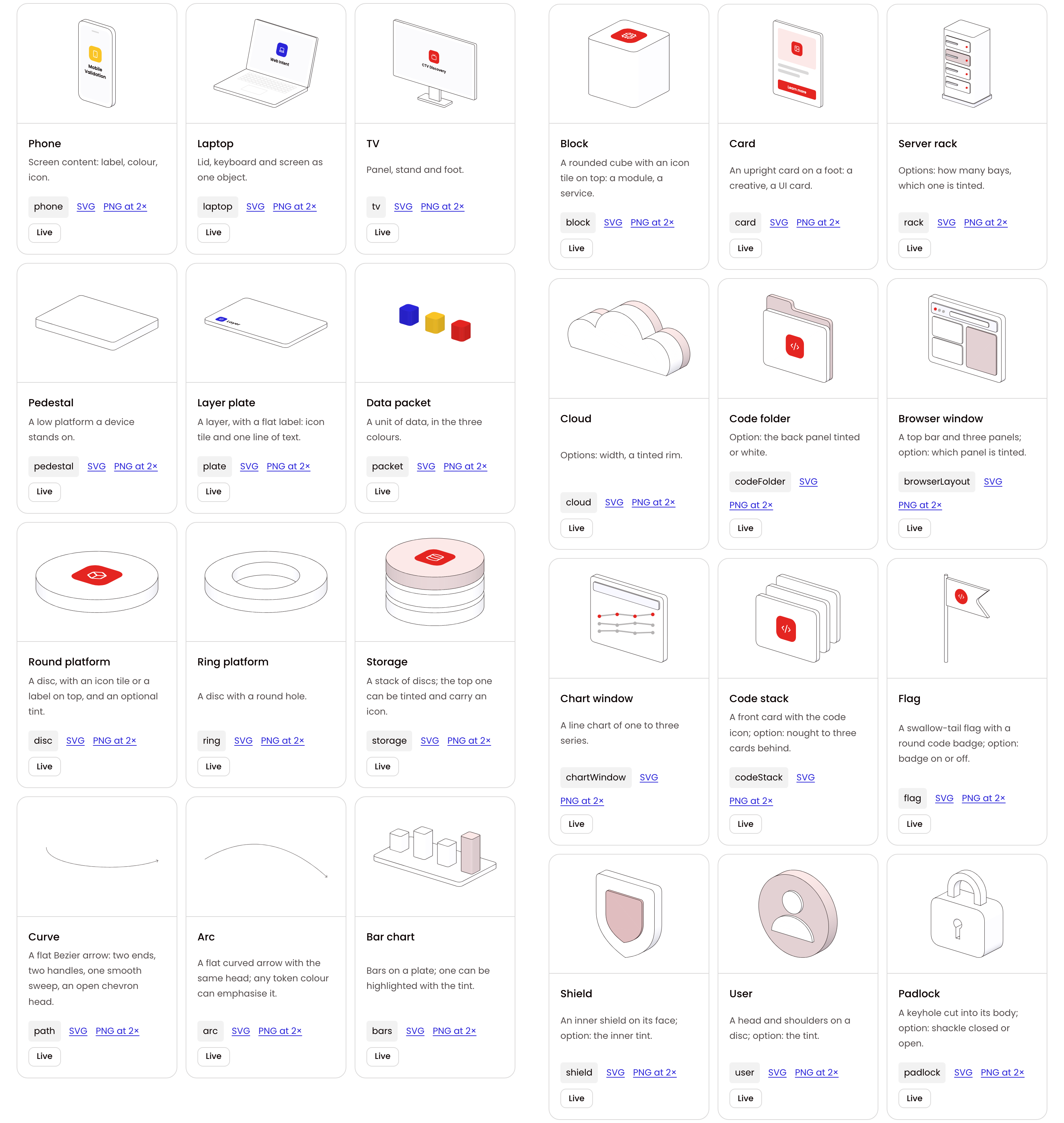
The system also holds an illustration library: 37 isometric objects — a phone, a laptop, a server rack, a shield, a megaphone — and 30 scenes composed from them. Every scene exists in four palettes and facing two ways, drawn twice from one description: live in WebGL for the web, and as a still for slides and PDFs. The mobupps.com case study shows how a page places one; this is the library itself.
Every scene is put together from the objects, so the objects are the library's vocabulary. Its showcase page lists each one with the name to ask for it by.
Loading the engine — until it is ready, the element shows the still, so a picture is never empty.
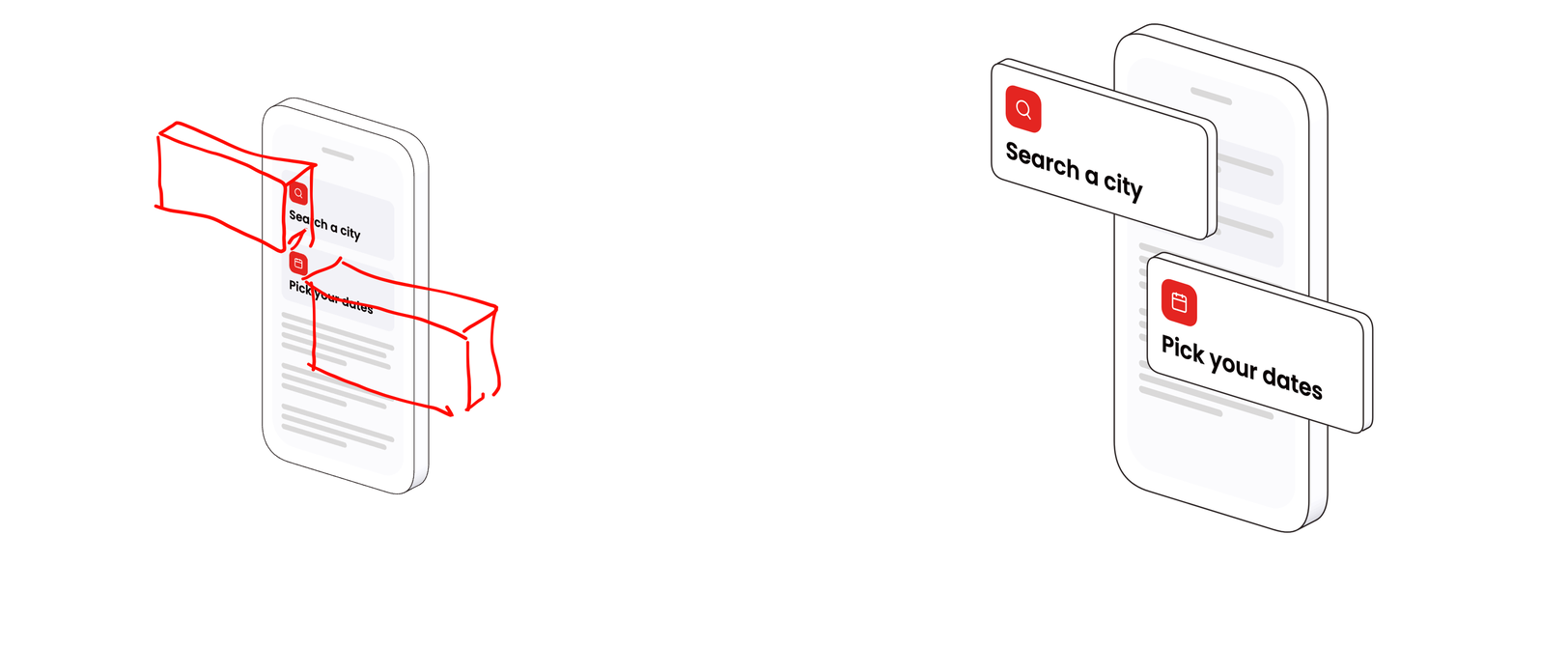
Nothing in the library is drawn by hand, but nothing reaches it without a designer's eye either. A complex new object is drafted with AI on a design canvas, rendered as a model, and marked up by me against the library's rules before any scene may use it. The markup is literal: red lines on the render, saying what moves where.
An object goes through the same loop, from more sides. For the megaphone the example was mine: a blueprint of it in six views — side, opposite side, front, rear, top and bottom. The first model built to it did not follow it closely enough, so the rule became that a blueprint is matched view by view: every part measured off my panels, the model drawn in the same six views beside them at one scale, and corrected until each pair agreed.
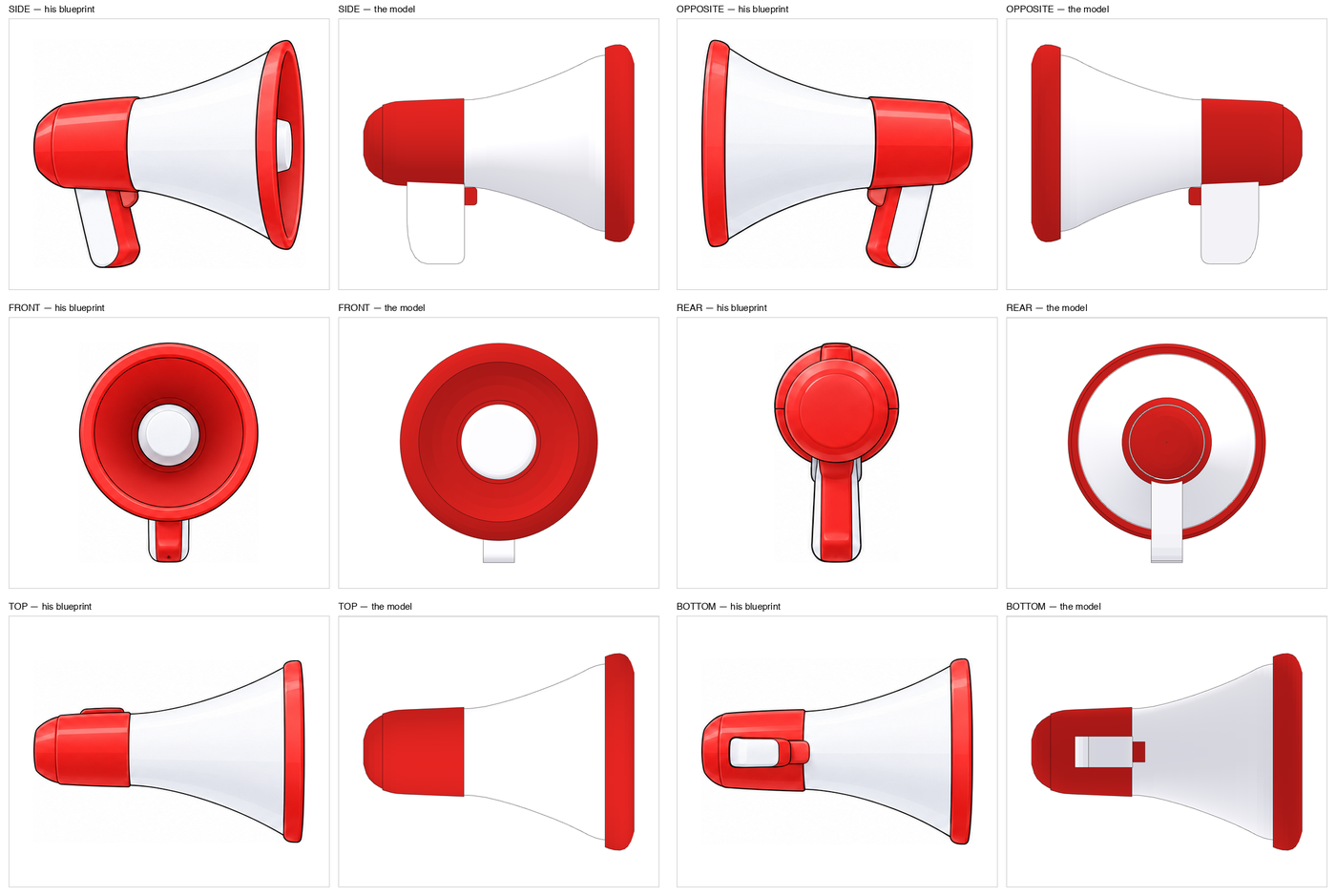
Then the review, on the model itself, before any file was made from it.
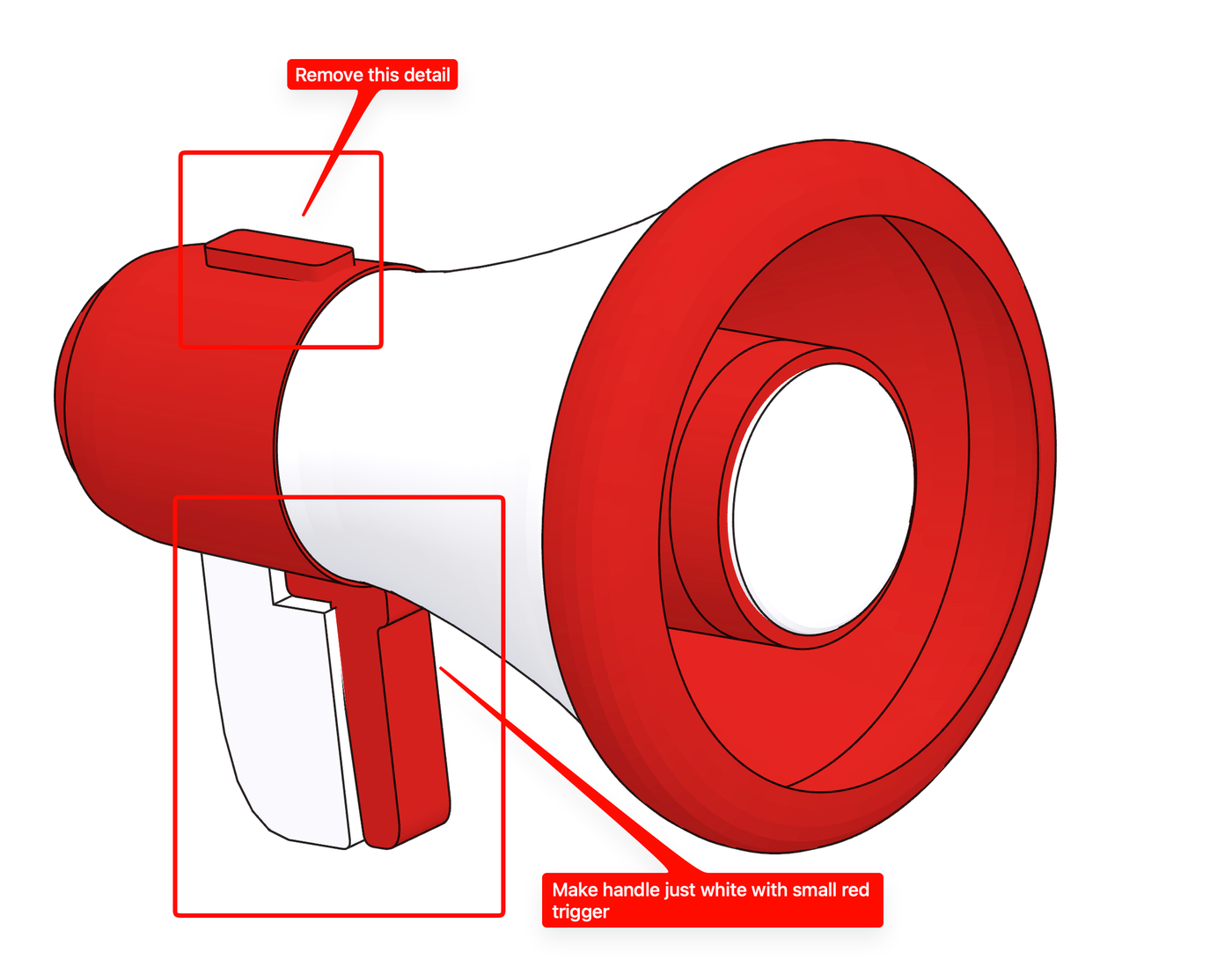
And the result — the megaphone as the library ships it, drawn live by the same engine as every scene above.
Loading the engine — until it is ready, the element shows the still, so a picture is never empty.
Some decisions are made on pictures and then held by the code. One object in the library, the pedestal, cast a soft shadow on the ground — the only shadow anywhere in it, and so an inconsistency on every page that used it. I looked at both versions, live and still, and removed it. The rule now is that no object casts a shadow: depth comes from the outline, the three lit faces and what stands in front of what.
The brand, for people who are not designers
The old brandbook was a PDF. A document that has to be re-exported to be corrected is a document that is wrong most of the time, so it is retired: the brand now lives in the same documentation, generated from the same source, in a section written for the people who use it most and who are not designers.
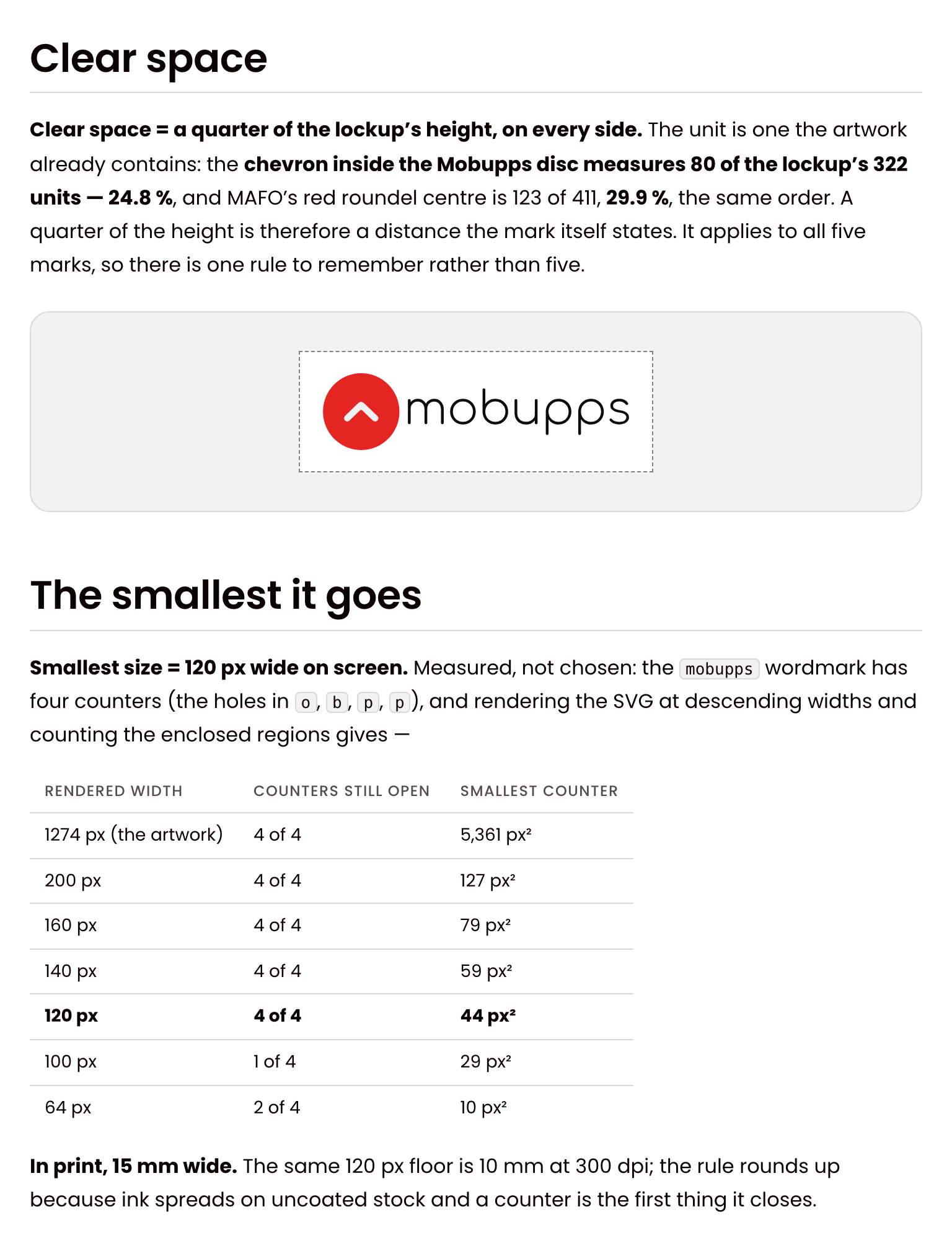
The logo page shows the five marks — the company and its four products — each on the ground it was drawn for, with every variant to download. Its rules are measured, not asserted. The clear space around a mark is a quarter of its height, a distance the artwork itself contains. The smallest size the wordmark may be used at was found by rendering it narrower and narrower and counting the letter counters still open; below 120 pixels on screen they start to close.
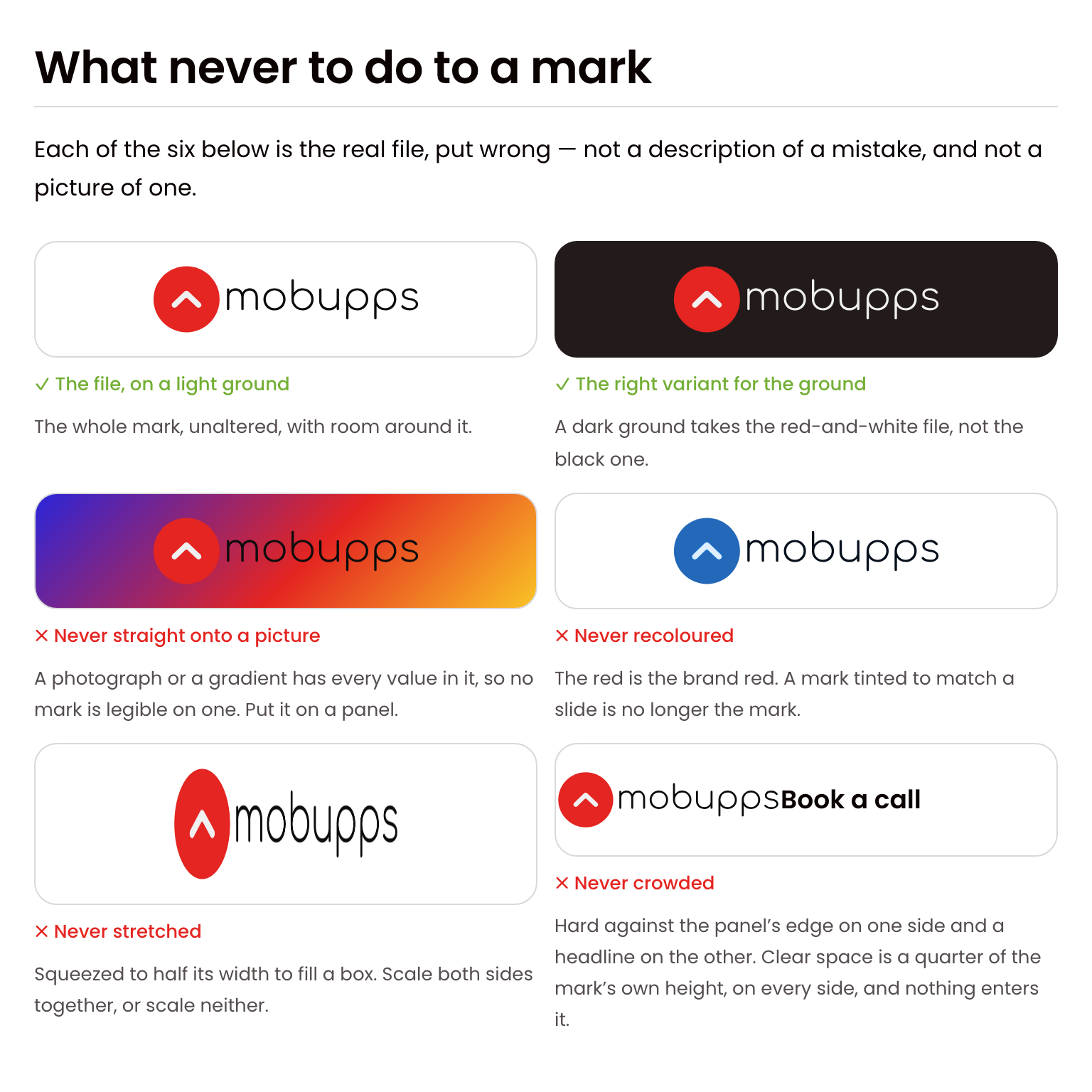
The mistakes are shown the same way: with the real file, put wrong.
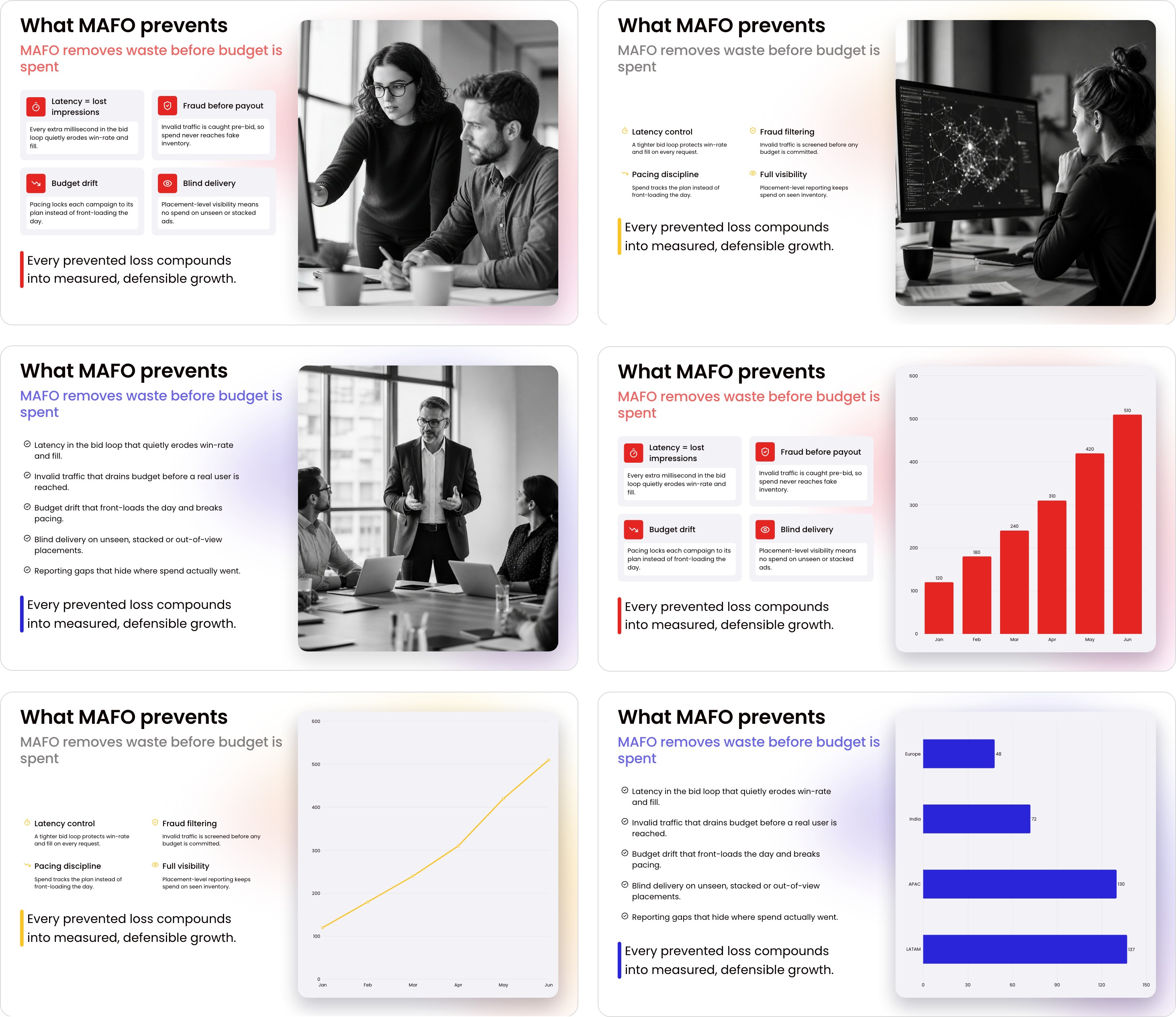
Most people meet the brand in a deck, so decks are built from the system too. The presentation page draws the deck's working set — nineteen layouts — in HTML from the same tokens and components as a product screen, at the slide's own sizes. A deck steps through the three colours, each slide taking the one after its neighbour, so no two neighbours match.
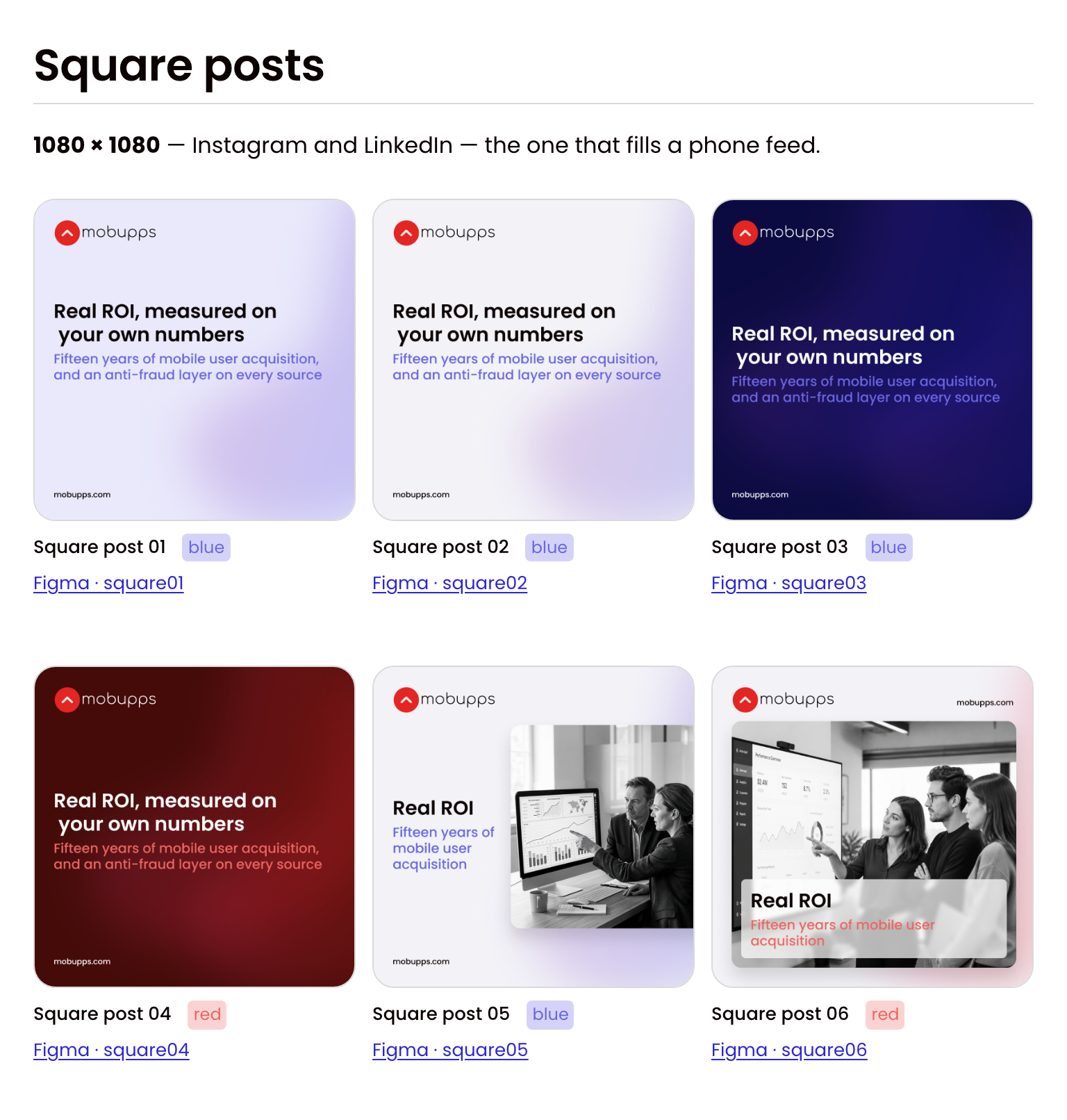
The social templates are nineteen frames at the sizes the platforms ask for — covers, link posts, square posts, stories — each made from the design system's tokens and components and shown at its real pixel size, with the editable frame one click away.
The swag follows the strictest version of the rules: one garment, one mark, nothing else. The mark is always placed from its file, never redrawn — a supplier is sent the file, and a redraw of it is refused.


Documentation the build writes
The documentation site has 110 pages, and none of them is edited by hand: a script generates every page from the repository — the tokens, the components and their contracts, the accessibility measurements, the roadmap, the changelog. A number on that site is the number in the build, or the build fails. Documentation that is typed separately from the thing it documents is wrong by the second release.
Beside it runs a workshop where every component is rendered from its specimen. In every test run each one is screenshotted and compared with a committed reference, and any changed pixel fails the run; an automated accessibility audit runs on each one too, and the few exceptions it allows each carry a written reason.
Built for the AI tools as well
Some of the company's slides and pages are now made by AI tools — Claude skills that build decks, dashboards and web pages. Before the system, each of them carried its own pasted table of colours, and the tables disagreed.
Now the build generates DESIGN.md, the file AI agents read to learn a design system, and lints it. The updated AI skills ask one skill about the system instead of carrying a palette: it holds no values of its own, it resolves any hex, old name or role to the right token, and a test fails the build if a value is ever pasted into it. The system is also published as a design system in Claude Design, so a new page or a new illustration starts from the same tokens and components as everything else — which is how the library's newest objects are drafted.
Proved where it matters, without surprising anyone
A design system is only as real as its first consumer. But a product team does not need a designer changing their code without warning, so I held to one rule: prove it in a working copy first, and hand the result to the owners.
The website runs on it. The new company website installs the tokens, the CSS and the illustrations as versioned packages, like any other dependency. Building it on the system sent more than forty requests back — a spacing step the scale lacked, a component a page needed. One of them: the site set every section 128 pixels apart and had typed that number by hand 39 times, because the spacing scale stopped at 80. The scale now runs to 128, and a named step carries the rule. The mobupps.com case study tells that side of the story.
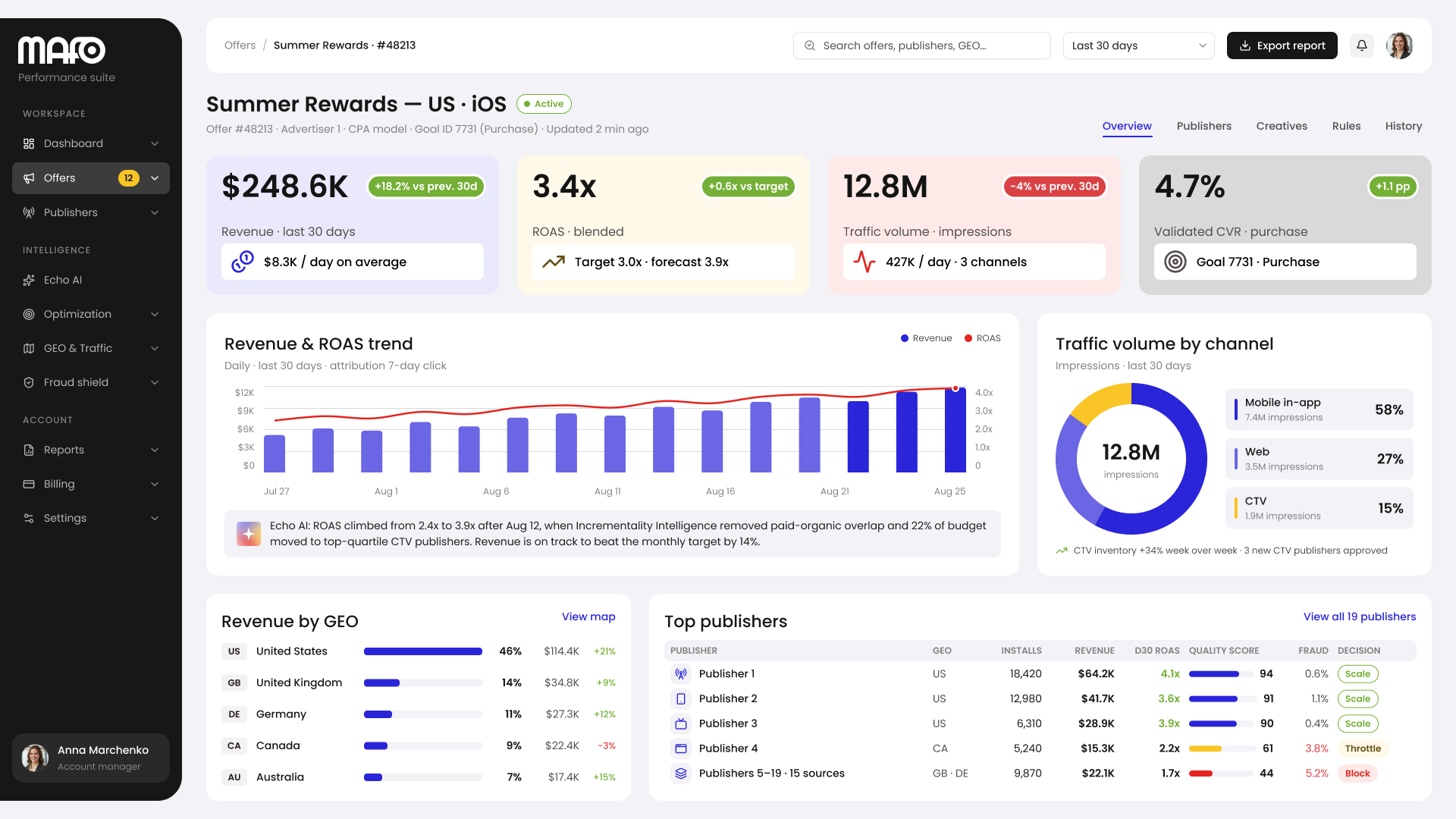
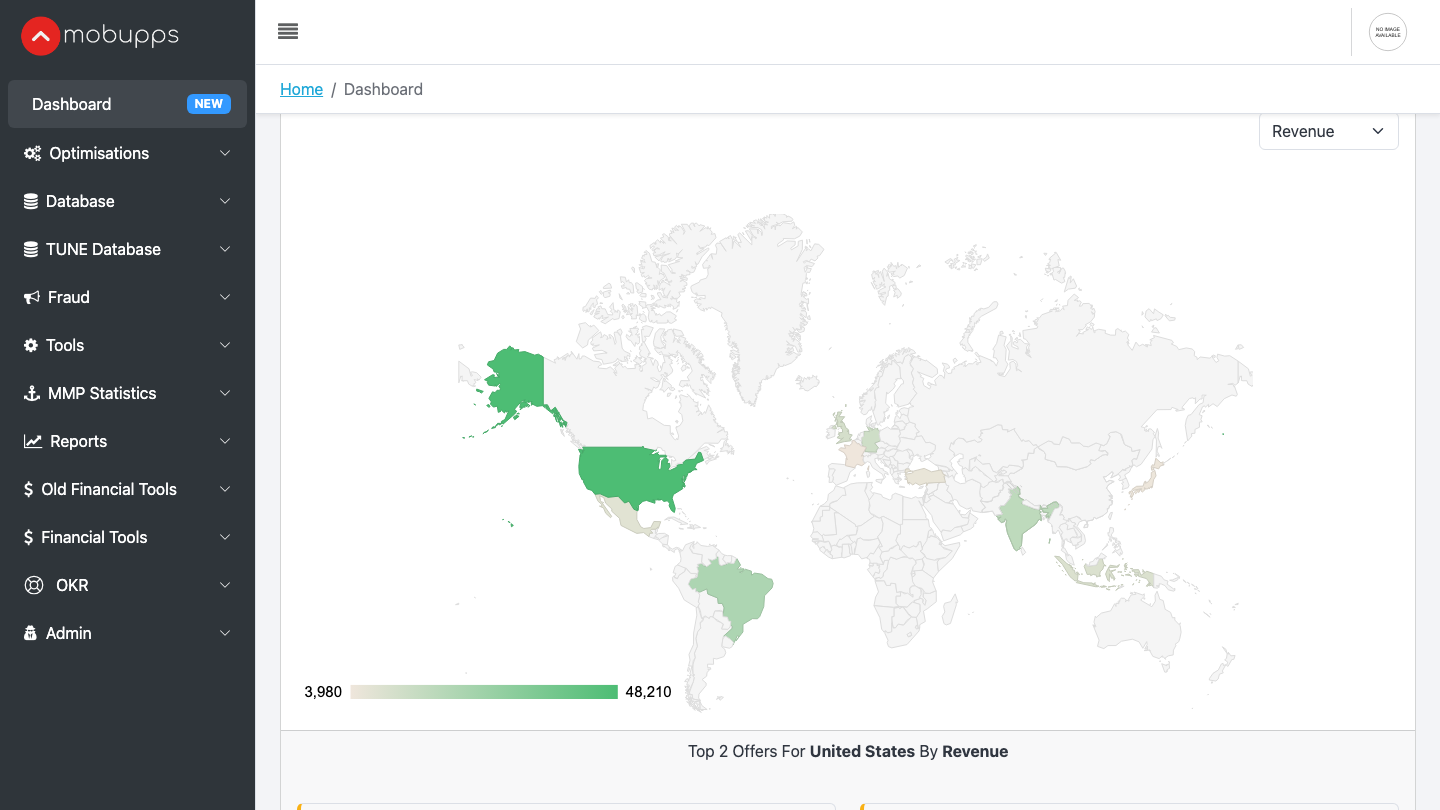
A product dashboard: where it is going, and the first step. MAFO, the company's advertising platform, was built without a designer, on a stock UI kit. I was asked for concepts of a new look for MAFO and the company's other products, and I designed them on the system.
 BeforeAfter
A concept is not a product, so the move itself starts smaller and proves itself first. In a working copy of MAFO, I themed the whole app from the tokens through its own UI kit and rebuilt two screens — the dashboard and a table page — on the system's components. The old kit's components disappeared from those screens entirely, and the app's stylesheet shrank from 619 to 365 KB, partly because the old kit had been loaded twice. I ran the themed copy against the live data before handing it over.
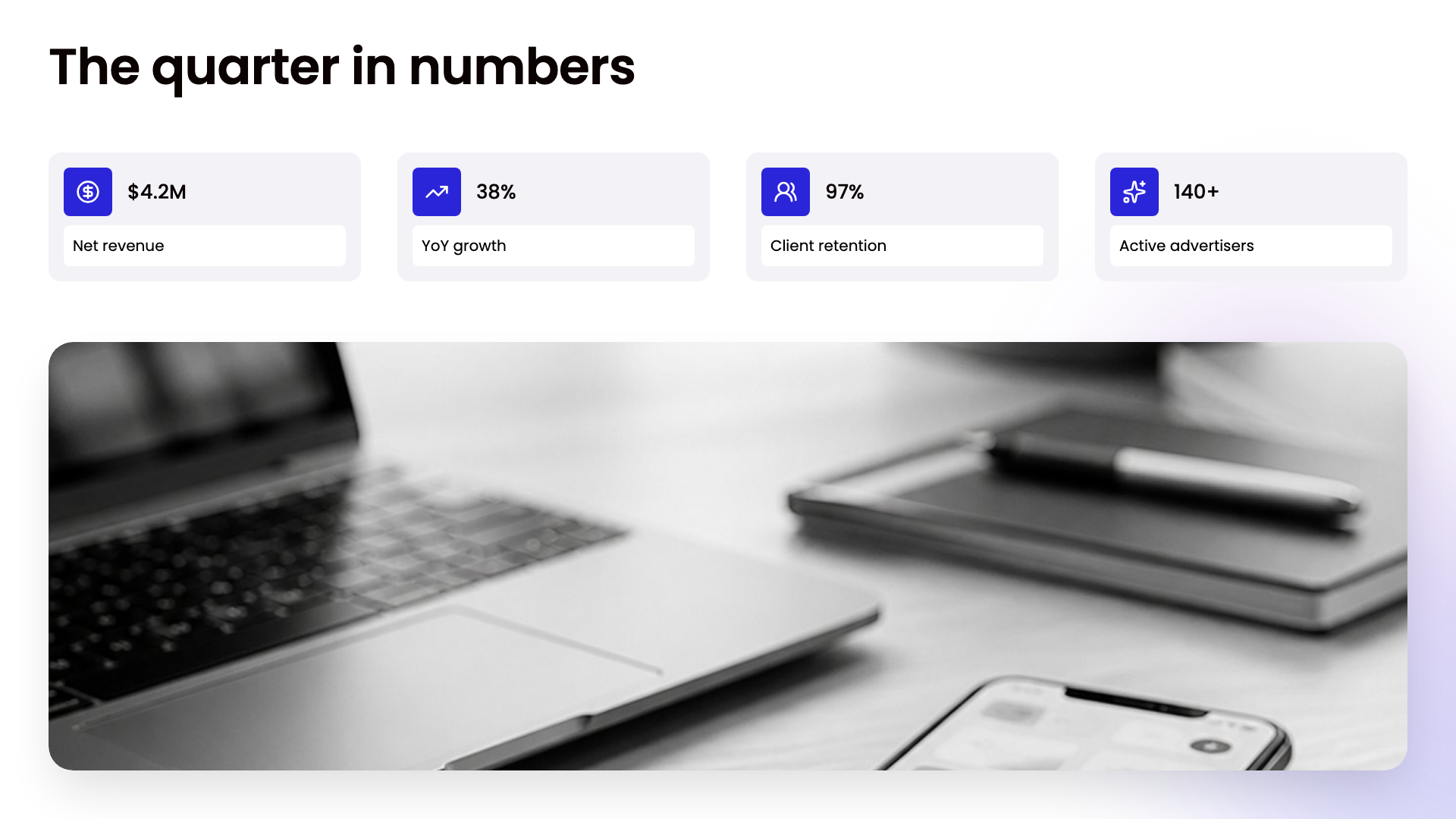
The deck tool, with nothing changed. The best migration is the one nobody can see. In a copy of the deck tool, I replaced its hand-kept palette with the system's tokens, mapping every old name to its new one so no existing rule broke. Then I compared every slide of twenty decks, pixel for pixel: 141 of 141 identical, and 593 of 593 of the tool's own rule tests still green. The colours now come from the system; the slides do not know.
 BeforeAfter
How it is run
A design system without an owner is a style guide with a release date. So the running of it is written down as plainly as the components are.
- Two approvers. The design lead and the tech lead. Some changes need one signature, some need both, and the rules say which.
- Versions that mean something. Each package is released on its own, with a version that says what changed: a changed value is a minor release, a removed name is a major one, and a rename keeps the old name working as an alias until consumers move. Thirty-four releases have been cut across four packages.
- One command checks every channel. A release is checked on the repository, the package registry, Claude Design and the documentation site, and the command reads the version back from each before it calls the release done.
What I would do differently
Look at the picture before trusting the gates. Once, every automated check on a component was green and its page was wrong in four ways at once — a logo drawn as a word, a bar wider than its container, a dropdown filling the screen. The checks tested what they were written to test; nobody had looked. That became a rule of the system: a component is checked rendered, and the check is the picture, not the stylesheet. I would have made it the rule on day one.
Count what is on screen from the start. My first audit counted names, not what reaches the screen. When I later measured usage, deleting a stylesheet nobody loaded raised the score by fifteen points without naming a single colour. I kept that out of the baseline — a number that improves when you look away is worthless — but measuring the right thing first would have found it sooner.
Measure whether people like using it, not only whether they use it. I skipped formal interviews: the system was already approved and the company was waiting for it, so the case for it was made. The cost is written down rather than argued away — the system measures how much of each surface runs on it, and nothing yet measures whether the people using it find it pleasant. That is the next instrument to build.
Scope, honestly
I designed the system and built it in Figma and Claude Code: the audit, the principles, the tokens and the build, the Figma library, the components and their contracts, the CSS, React, chart and illustration packages, the documentation and the workshop, the accessibility measurements, and the way the system is governed. The tech lead is the second approver. The product teams own adoption in their products, and the production apps were not changed by this project.
The company's logos predate the system; it documents them and sets their rules. The swag pictures are renders I made for the brand pages, not photographs of produced pieces.
Results
6 → 1
Names for the brand blue
One hex code, six names across the deck kit, the site, its stylesheets, the deck tool and an AI skill — now color/blue/400 everywhere, from Figma to Python.
386
Tokens, written once
They generate the Figma variables, CSS, SCSS, two Tailwind formats, the shadcn theme, a Python module for PowerPoint, and the DESIGN.md the AI agents read.
27
Checks in every test run
From "no hard-coded value above the first tier" to "Figma, code and documentation name the same components". A rule with a test behind it.
0 → 12 of 12
Focus-ring pairs that pass
The old ring was a 15% tint, about 1.2:1 against the page. Rebuilt as a 2 px line, it clears the 3:1 floor on every surface a control can sit on.
141 of 141
Deck slides unchanged after the move
The deck tool's hand-kept palette swapped for the system's tokens and compared pixel for pixel — 593 of 593 of its own rule tests still green.